Google has published a help document called “Manage offers on your Business Profile.” If you manage Google Business Profiles, review how offers are handled for each location, including whether an offer is created through an Offers Post or may be discovered from a linked social media profile.
Offers are limited by region and language
Google Business Profile offers are available only in select regions and languages. That makes eligibility an important first check before you plan or publish an offer for a location.
For agencies and multi-location teams, keep the review at the location level. An offer available for one profile may not be available for another.
Review both ways offers can appear
Google’s guidance covers two sources for offers on a Business Profile:
An offer created through an Offers Post
A special offer Google discovers through a linked social media profile
This means your offer review should not stop after checking Posts. Where social profiles are linked, review the special offers being shared there too.
Use the new guidance in your profile checks
Add offer management to your regular Google Business Profile workflow:
Confirm whether offers are available in the location’s region and language.
Review Offers Posts published for that location.
Check linked social media profiles for special offers that may be discovered by Google.
Make sure the offer information you want customers to see is accurate for that location.
A consistent review process can help teams keep offer information aligned across the profiles they manage.
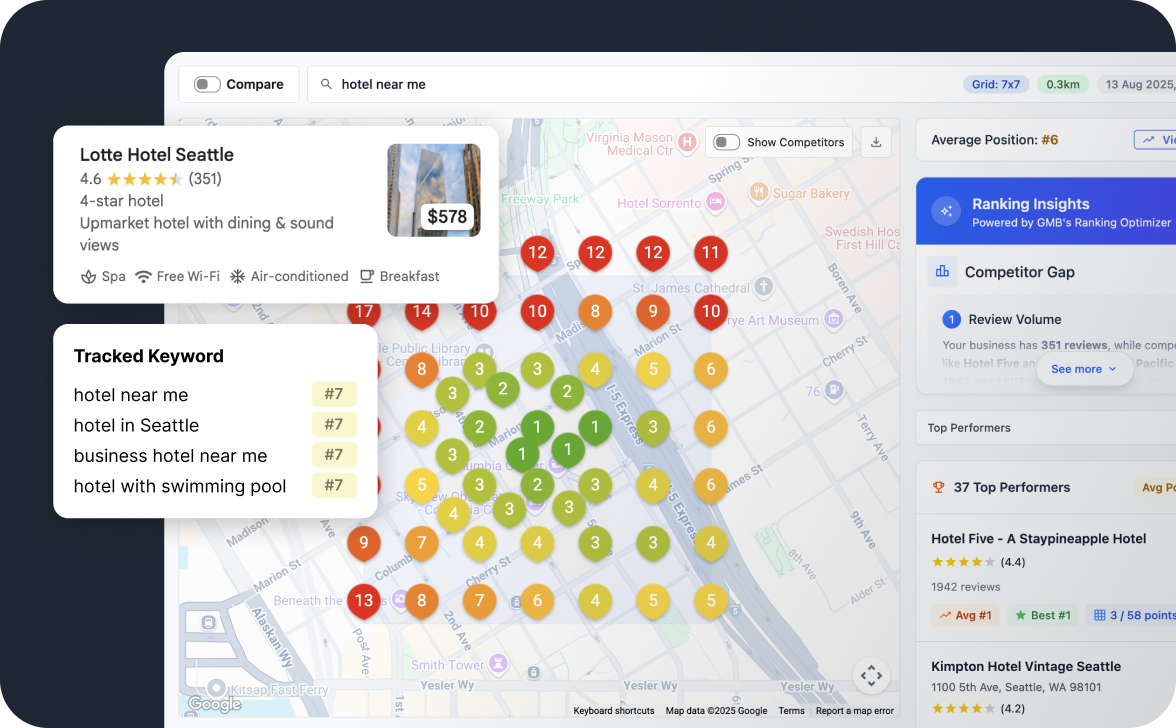
Review your location data alongside your local search visibility in Grid My Business.
Google has been suspending Google Business Profiles (GBP) in waves since late April 2026. Three rounds of enforcement in under two months, and the suspensions have not stopped.
Agencies with client documentation already on file recovered fastest.
Three Enforcement Actions, One Pattern
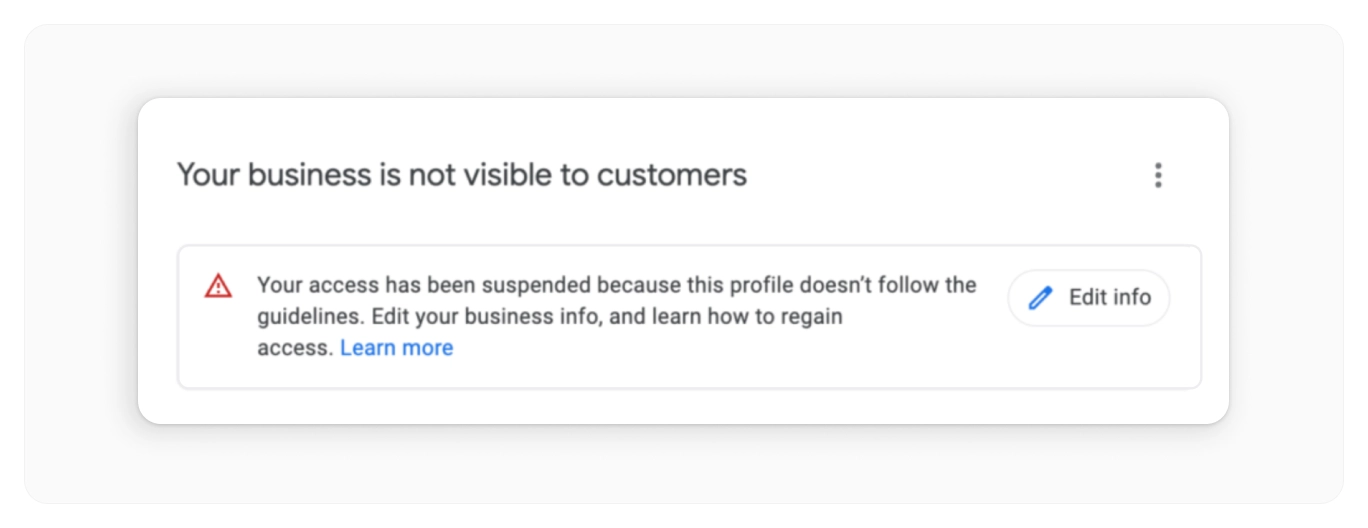
Wave 1 (April 27, 2026): Google suspended a large number of individual GBP listings overnight. Every affected profile received the same label: "Deceptive Content." Legal firms, medical practices, HVAC contractors, locksmiths, and garage door companies were hit hardest.
Wave 2 (May 3, 2026): Six days later, Google escalated from suspending individual profiles to restricting entire Google accounts. A Google account is the login that manages all of a business's or agency's GBP listings. One account restriction takes down every profile under that account at once and blocks the ability to add or claim new listings.
The consequence is the same across all three waves: zero visibility in Google Maps until the restriction is lifted.
Why Legitimate Profiles Are Getting Caught
Google's automated enforcement flags profiles that share characteristics with known spam, regardless of intent.
In high-spam verticals, legitimate businesses often share many of those same characteristics:
Service areas that cover unusually large geographic regions
Business names stuffed with keywords
A primary category that does not match the main service the business provides
Phone number formats that appear across clusters of suspicious listings
Waves 2 and 3 appear to have added new triggers. Businesses running Local Services Ads (LSA) alongside their GBP have been disproportionately hit, suggesting Google may be connecting signals across both products.
Businesses in highly competitive markets, particularly in California, are also being evaluated more strictly.
Based on observed enforcement patterns, Google appears to be using Gemini AI to flag inconsistencies before enforcement takes place. If a business's name, address, or phone number on Google does not match what is on their website or other directories, it can be flagged before any human reviews the case.
Two Suspension Types, Two Different Recovery Paths
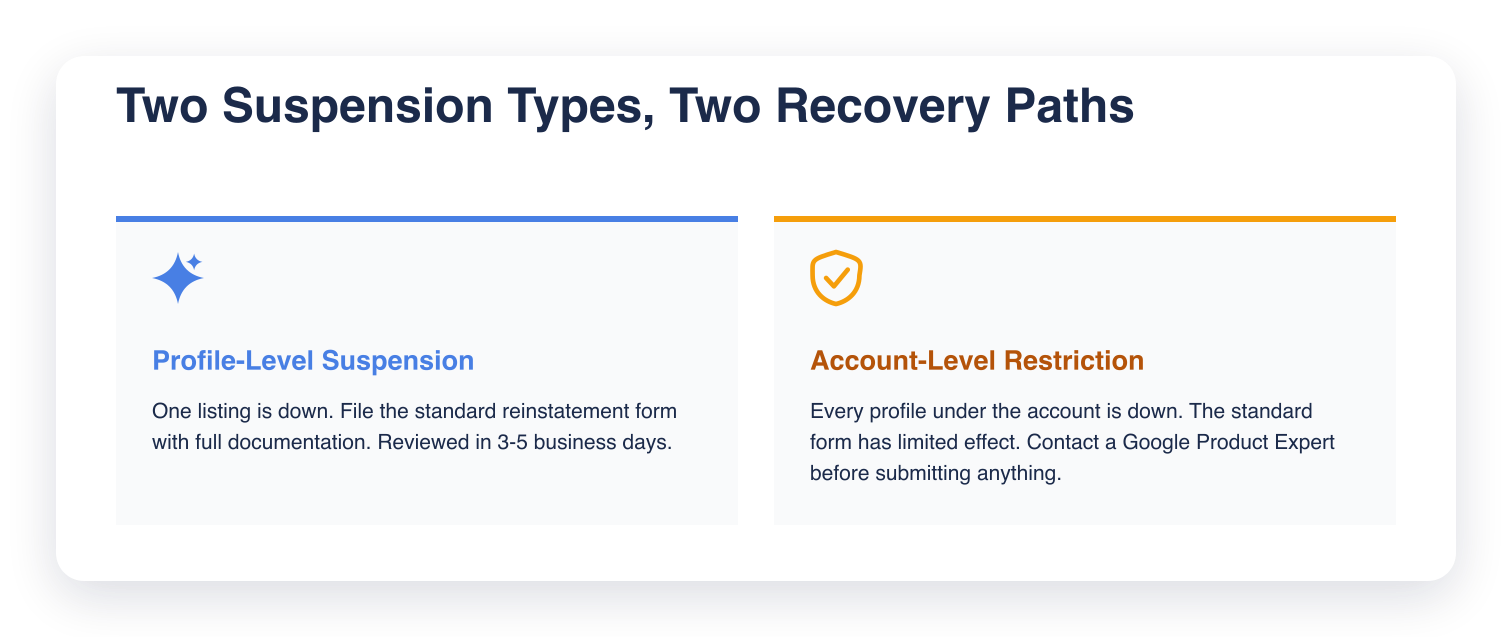
How you appeal depends entirely on which type of action hit the account:
Profile-level suspension (Wave 1)
One listing is suspended. The business still exists on Google, but this specific profile shows a violation notice and no longer appears in search results.
The fix is the standard reinstatement form inside GBP Manager. Submit once, with complete documentation. A well-documented appeal is typically reviewed within three to five business days.
What gets appeals approved:
Business documentation: government-issued business license, articles of incorporation, or equivalent registration
Address verification: utility bill, lease, or official correspondence at the registered location, dated within 12 months
Physical evidence: photos of signage, storefront, branded vehicles, or staff in uniform
Account history: when the Google account was created, when the profile was first verified, brief operating history
The pattern that wastes the most time: a thin first submission, then a second with the same documents a few days later, then a third. Each resubmission resets the queue. The appeal was never going to clear without the documentation.
Account-level restriction (Wave 2 and 3)
Every profile under the account goes down at once. This is a different type of action entirely. The Google account itself has been restricted, not just one listing.
The standard reinstatement form is widely reported to have limited effectiveness for these cases. Google Product Expert escalation is the recommended path.
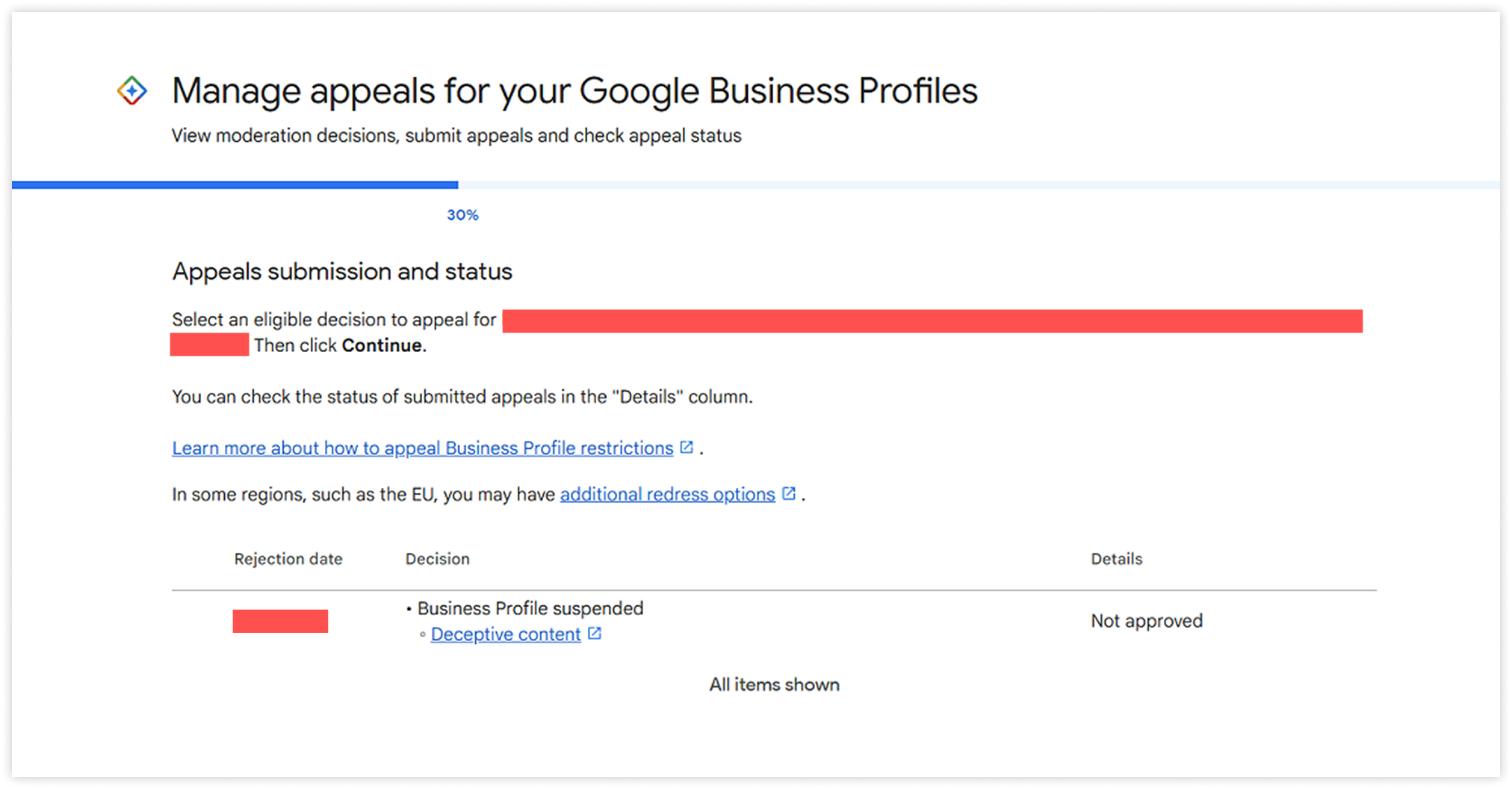
Here is what the standard reinstatement form looks like before it routes to an account restriction case:
Contact a Google Product Expert through the GBP community forum before submitting anything formally. Google Product Experts are trained community moderators who can confirm the correct channel and help avoid a submission that complicates the case.
The Reinstatement Packet to Build Now
Think of this as a client folder containing everything needed to file an appeal today, if a suspension hit tonight.
Collect these documents while nothing is wrong. Asking a client for their business license mid-suspension is the slow way to do this.
What to include for every client:
Business license or registration (most recent, government-issued)
Proof of address (utility bill or lease at the registered location, dated within 12 months)
Verification history (screenshot of when the GBP was first verified)
Google account record (the managing account email and when it was created)
Profile snapshot (current categories, business name, service area, phone number, hours)
Physical evidence (photos of signage, storefront, or branded materials)
Cross-platform consistency check (does the name, address, and phone number match exactly on the website, Google Ads, and LSA profiles?)
Operating history note (one paragraph: when the business opened, what it does, how long it has been a client)
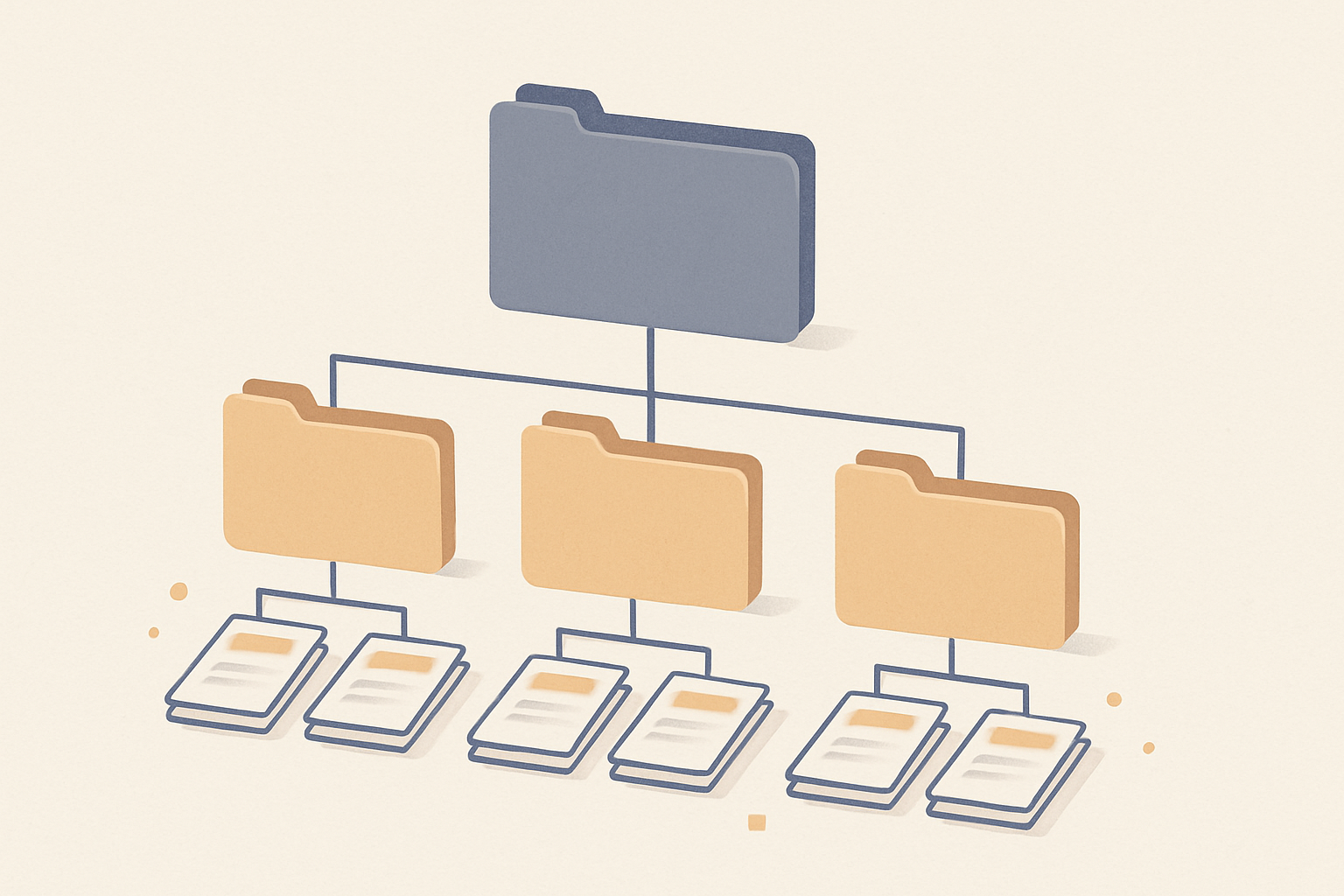
An organized per-client folder makes this retrievable under pressure:
Store it somewhere the whole team can access. Google Drive or Notion both work.
Update the address verification document annually, and the profile snapshot whenever the profile changes.
For multi-location clients, each location needs its own folder. A packet built for the flagship will not support an appeal for a satellite office.
How to Spot a Suspension Before Your Client Does
You will usually see it in rank first. By the time a client calls to say they have disappeared from Google Maps, time is already lost.
The rank pattern on a local SEO heatmap shows which type it is before you open GBP Manager. A single-profile collapse in Grid My Business points to an individual suspension. A simultaneous collapse across all profiles under the same account points to an account restriction, and that distinction determines which recovery path you take.
After any unexplained rank drop, check the profile status directly in GBP Manager. A suspended profile shows the violation notice on login. An account restriction shows at the account level before you reach any individual listing.
Catching it the same day gives you time to route the appeal correctly before the client notices.
Wrapping Up
The enforcement that started on April 27 has not resolved. Three rounds in under two months, with Wave 3 still running, is a sustained shift in how Google is policing GBP.
Build the reinstatement packet for every client this week. Know which account manages which profiles. Confirm business information matches exactly across Google, the website, and any ad platforms.
Frequently Asked Questions (FAQs)
Q: Can a GBP be re-suspended after reinstatement?
A: Yes. Reinstatement does not guarantee the profile will not be flagged again if the signals that triggered the original action were not addressed. After reinstatement, run a cross-platform consistency audit and update the documentation packet before considering the case closed.
Q: Should you use one Google account to manage all client profiles?
A: Using a single account to manage every client creates significant risk. If that account is restricted under a Wave 2 or 3 type action, every client profile it manages goes down at once. Separating clients into individual or clearly segmented accounts limits the blast radius of any single enforcement action.
Q: Can changing profile information while an appeal is pending hurt the case?
A: Yes. Editing a suspended profile during an active appeal can reset the review queue or introduce new inconsistencies that complicate the case. Submit the appeal with the profile in its current state and hold off on any changes until the restriction is lifted.
Q: How often should the reinstatement packet be updated?
A: Update the address verification document annually and the profile snapshot any time the business changes its name, categories, service area, or phone number. Build both into your regular client check-in cadence so the packet is ready when you need it.
Q: What should you tell clients while an appeal is in progress?
A: Be direct about the timeline: profile-level suspensions take three to five business days, account-level restrictions are less predictable. Tell clients the profile is under review with Google, avoid speculating on the outcome, and set a check-in date.
Most agencies audit the obvious things. Reviews, citations, photos, NAP consistency. Primary category outweighs all of them and usually gets set once at onboarding and never reviewed.
Primary category is the single most heavily weighted optimizable signal in Google's local ranking algorithm. The majority of profiles are in the wrong one.
This guide covers auditing an existing profile's category. If you manage GBP profiles for clients, here is how to check whether their primary category is costing them rank, and how to fix it.
Why Primary Category Carries More Weight Than Anything Else
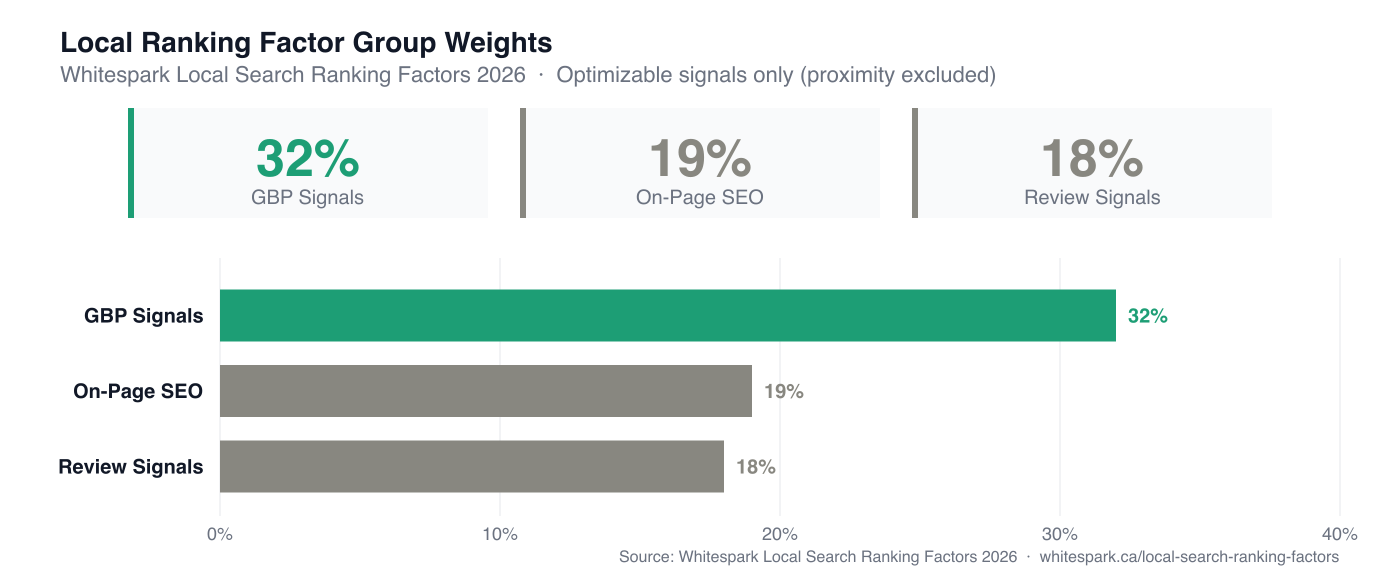
GBP signal weighting = 32% of local ranking weight, according to Whitespark's 2026 Local Search Ranking Factors report. Within that group, primary category is ranked the single most important individual signal.
When Google evaluates a profile for a query, it first determines relevance: does this business compete for this search at all? Primary category is the mechanism that answers that question. Category determines which queries a profile is eligible to rank for in the first place.
Proximity — how close the searcher is to the business — is Google's single largest ranking factor overall. Proximity can't be changed. Category can, which is why it is the highest-leverage signal on the list of things you can change.
Get it wrong, and no amount of review velocity or citation building will compensate, because the profile isn't in the pool at all.
The Whitespark 2026 Local Search Ranking Factors report breaks down how the weight is distributed across factor groups:
Local ranking factor group weights, Whitespark Local Search Ranking Factors 2026. Optimizable signals only; proximity is Google-controlled and excluded.
Check What Your Client Is Currently Listed As
Open the profile in Google Business Profile Manager and navigate to Edit Profile. The primary category sits at the top of the Info tab. Write it down before you change anything.
The most common finding at this step: the category was chosen by whoever set up the account, reflects the broadest possible description of the business, and has not been reviewed since.
For multi-location clients, check each location individually. Category assignments do not inherit from a parent account. Each profile competes on its own.
Map the Dominant Service, Not the Broadest One
Primary category should reflect the service that drives the most search demand, even if that isn't the full scope of what the business offers. That is what "specific over generic" means in practice, and the practical part is defining "specific." If a client does HVAC and plumbing, the primary category is whichever vertical generates more local search volume in their market. To find that: pull the core service terms for each vertical into Google Keyword Planner filtered to the business's city or metro and compare monthly search volumes. If the client has Search Console history, filter by location and compare click volume per service cluster. Either gives you a defensible answer; the Keyword Planner route works even for prospects with no GSC access.
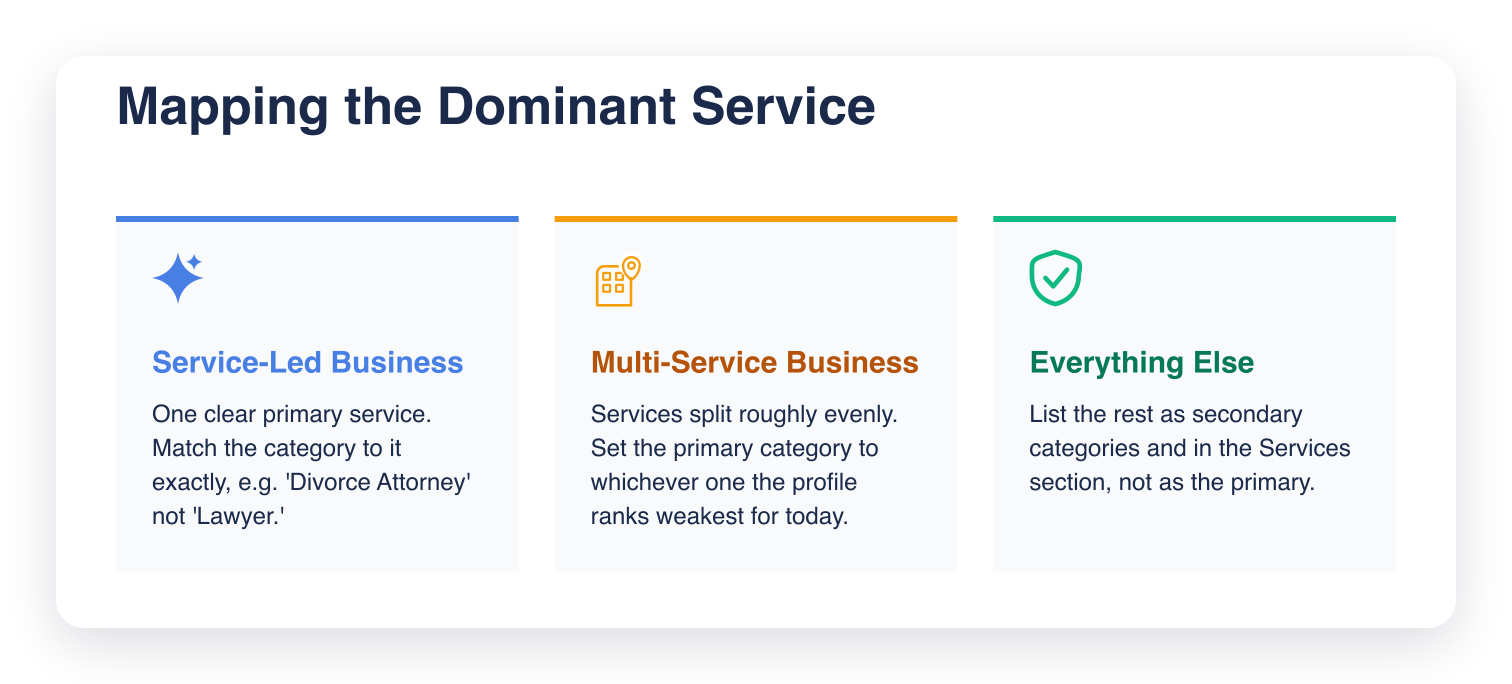
Service-led businesses
If the business has one clear primary service, the choice is straightforward. A divorce attorney should be listed as "Divorce Attorney," not "Lawyer." A nail salon should be "Nail Salon," not "Beauty Salon." The more specific the category, the smaller the competitive pool and the tighter the relevance match.
Multi-service businesses
If the business genuinely spans multiple services at roughly equal volume, make a call based on where the profile is weakest relative to competitors. If they rank well for service A and poorly for service B, lean the primary category toward B and shift A to secondary.
This is a judgment call. It is also revisable. See the verification step below.
Here's how to choose depending on which type of business you're auditing:
Check What the Top-Ranked Competitors Are Using
Search the client's target keyword in Google Maps, then open the top three to five profiles in the local pack and note each one's primary category. Most audit guides skip this step, and it is the most useful one in the list.
You are looking for two things:
The pattern: if four out of five top-ranked profiles share the same primary category, that is a strong signal that Google's algorithm associates that category with the query.
The outlier: if one top-ranked profile uses a different category and still ranks, check whether they are compensating with exceptional review volume or proximity.
This step also reveals category options you may not have considered. Google's taxonomy has more than 4,000 categories. Competitive research surfaces which ones are working in a given vertical and market.
Cross-Reference Against Google's Taxonomy
Once you have a target category from the previous two steps, confirm it exists exactly in Google's taxonomy before changing anything.
Search for the category name directly in the GBP category field. Google autocompletes from its live list, showing available exact matches as you type.
If the exact term does not appear, try variations.
Two common mistakes here:
Choosing a near-match when the exact category exists. "Restaurant" when "Italian Restaurant" is available. "Contractor" when "General Contractor" is in the list. The exact match carries stronger relevance signal.
Choosing an exact match that is too niche. Some categories are so specific they carry no meaningful search volume. If Google's autocomplete surfaces it but competitive research shows nobody ranks with it, treat that as a warning sign.
When no exact or near-exact match exists, choose the most specific available option and compensate with service descriptions and attributes.
What the Audit Looks Like in Practice
An HVAC and plumbing contractor was ranking outside the top 10 in the local pack for HVAC-related searches despite strong review velocity and a well-maintained profile. The primary category was "Plumbing Contractor" — chosen at account setup, unchanged since.
Competitor audit: the top five local pack results for AC repair in that market were all listed as "HVAC Contractor." One used "Air Conditioning Contractor." None used "Plumbing Contractor."
Keyword Planner confirmed HVAC terms generated roughly twice the local monthly search volume as plumbing terms in that city. The profile was ranking well for plumbing already. The category still matched the service the client had already won, and missed the one they were losing.
The fix: primary category changed to "HVAC Contractor," "Plumbing Contractor" moved to secondary.
Two weeks later, the before/after grid scan showed rank movement into the top 5 across the central and northern zones of the service area for HVAC searches. The strongest gains were closest to the business address, which is typical. The category correction does not override proximity. It removes the relevance block that was keeping the profile out of the pool. Plumbing rank held flat. The secondary category preserved it.
The audit is looking for the category that Google already associates with the queries the client wants to rank for.
How to Verify the Impact After You Change It
Google typically re-indexes a profile within 7 to 14 days of a primary category change. Make the change, then give it that full window before you judge anything: rank shifts surface across the full two weeks.
To measure impact properly, run a grid scan before the change and another 14 days after. A grid scan shows rank across a geographic grid of points, not a single position number. A local SEO heatmap shows the same results as one color-coded map. Category changes tend to produce uneven shifts. They tend to be stronger in some parts of the service area than others, and a single-point rank check will miss that:
A geo-grid scan in Grid My Business. Rank is shown across a grid of points over the service area.
Grid My Business runs geo-grid scans that let you compare rank distribution before and after a change. It is the cleanest way to see whether the category correction moved anything.
One caution: do not change the primary category again if rank does not move immediately. Give it the full two weeks. Frequent category changes can trigger a review flag on the profile.
Secondary Categories: How Many Is Too Many
Google allows up to nine secondary categories, but adding all nine dilutes the signal your primary category sends. Google uses the full category set to understand the business. If you add eight categories that point in different directions, Google's interpretation of relevance gets less precise.
The 2026 best practice: two to three secondary categories, tightly related to the primary. They should describe services that genuinely complement the main offering.
If a client has a long list of services, use the Services section of GBP to describe them. Use categories for search relevance and the Services section for the full list of services.
Wrapping Up
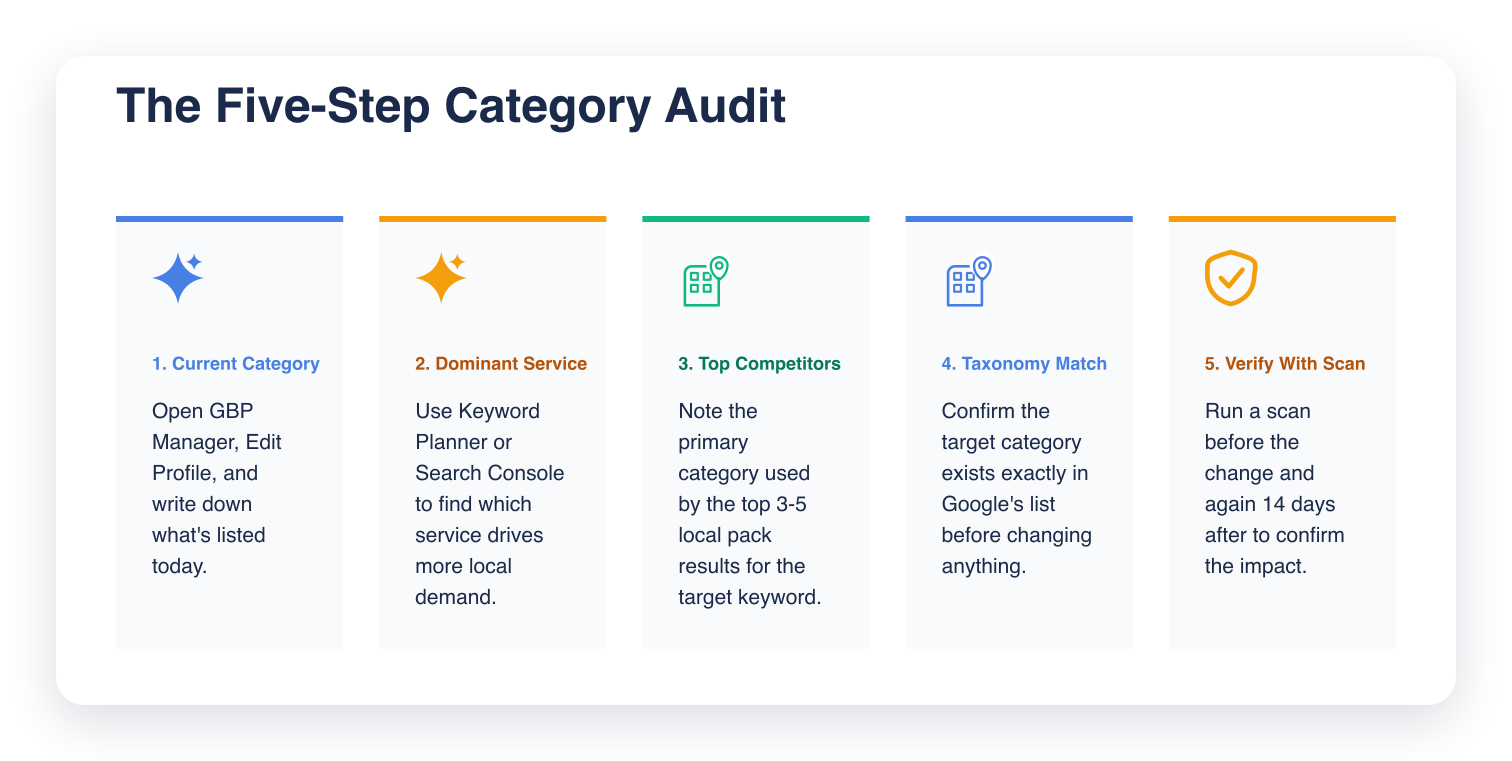
The audit is five steps: check what the profile is currently listed as, map the dominant service, research what the top-ranked competitors in the local pack are using, cross-reference against Google's taxonomy, and verify rank impact after the change with a grid scan.
Run this across a client roster and you will keep finding the same pattern: profiles sitting in a category broader than the business competes in. The fix is usually one change, confirmed by a grid scan two weeks later.
If you are not already tracking rank across the service area before and after changes, Grid My Business shows rank across the whole service area.
Frequently Asked Questions (FAQs)
Q: Does changing a primary category reset my Google Business Profile ranking?
A: No. A category change does not reset your profile or erase accumulated signals like reviews and citations. It changes which queries your profile competes for and how relevant Google considers you for those queries. Rank typically shifts within 7 to 14 days.
Q: Can I have the same primary category as my competitor?
A: Yes, and in most cases you should. If the top-ranked profiles in your vertical are all using the same primary category, that category is what Google associates with those queries. Differentiating on category to avoid competition usually backfires. It removes you from the pool entirely.
Q: How often should I review a client's primary category?
A: At minimum, quarterly. Also review it when the client expands or changes their service mix, when a new competitor enters the local pack, or when rank drops without a clear explanation. Category misfit is one of the first things to check when a profile starts slipping.
Q: Does primary category matter more for service area businesses or storefronts?
A: Both. The mechanism is the same: primary category sets relevance for the queries Google will consider the profile for. Service area businesses may see a wider geographic rank distribution shift after a category correction because they are not anchored to a single address.
Q: What should I do if no category in Google's list exactly matches my client's business?
A: Choose the most specific available option that accurately describes the dominant service. Do not force an exact-sounding match that misrepresents the business. Use the Services section and business description to provide the specificity that the category cannot. Google cross-references all of these signals.