Blog

  • Does Using “Dental” in a Practice Name Improve Local Rankings? Big Data says Yes.

    Does Using “Dental” in a Practice Name Improve Local Rankings? Big Data says Yes.

    Agencies get asked this by clients constantly. A dentist wants to know if renaming to something like "Riverside Dental" instead of "Riverside Smiles" will move their rank.

    Most answers online split into two camps: "yes, always" from SEO folklore, or "no, Google penalizes keyword stuffing." Neither camp has real data behind it.

    So we pulled the data. Across 3,388 dental markets, practices with a dental term in their business name carry a real, measurable rank advantage over same-market rivals without one.

    The numbers below come from Grid My Business's own production grid-scan data, not a survey or a third-party estimate.

    But the data can't answer the question agencies get asked, which is whether an established practice should rename to get it.

    Add "Dental" to Your Name and Rank Higher

    A dental term in the business name (dental, dentist, smile, and similar) carries a median advantage of 2.25 positions over same-market rivals without one, comparing businesses within the same local market and the same scan. That's the strongest single-attribute effect in the entire dataset.
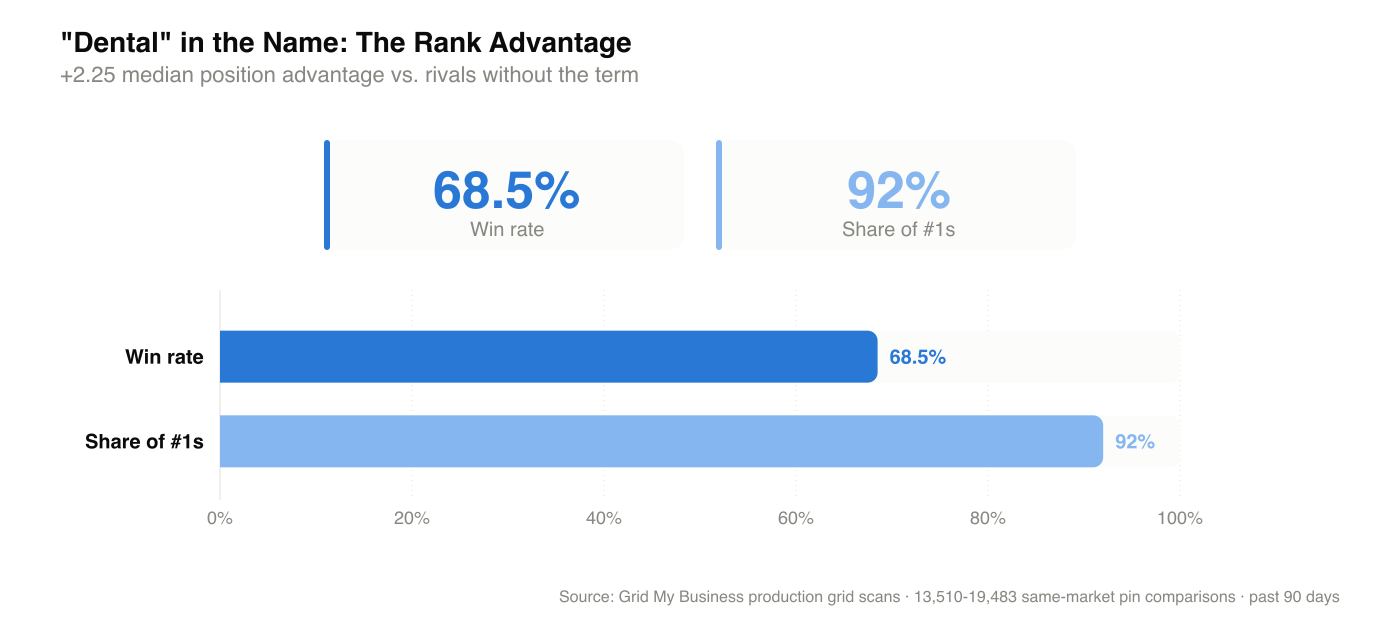
    A dental term in the business name wins 68.5% of head-to-head pins and appears in 92% of #1 spots, a +2.25 median position advantage over rivals without one

    It beats every other attribute measured: a website adds +1.76 positions, the right primary category adds +0.94.
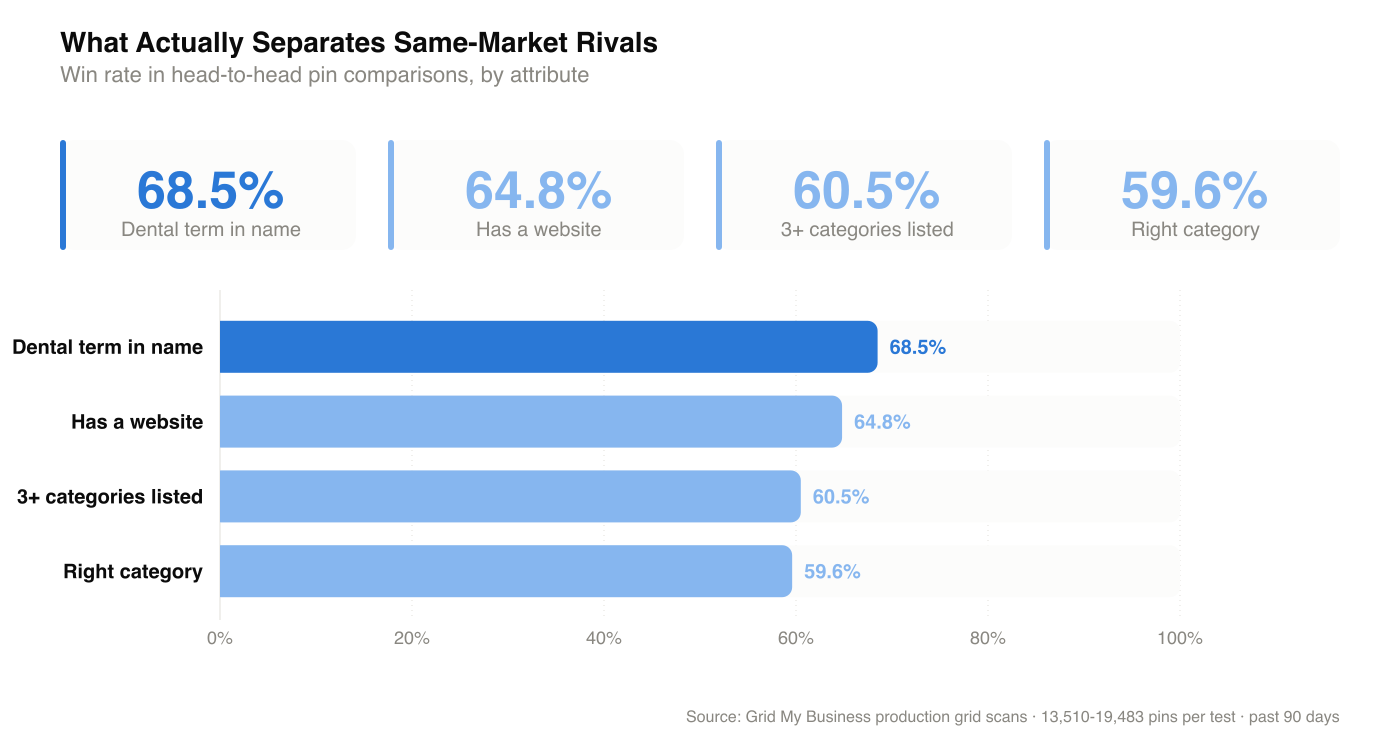
    Dental term in name wins 68.5% of head-to-head pins, ahead of having a website (64.8%), listing 3+ categories (60.5%), and the right primary category (59.6%)

    Methodology: 13,510 to 19,483 same-market pin comparisons over the past 90 days. Matching within a market removes market-level differences in competition and demand. It does not remove business-level differences like size or review count, which is why the next section covers what this data can't separate.

    What This Data Can't Tell You

    Even a same-market comparison this clean is consistent with three different explanations, and the aggregate data can't distinguish between them:
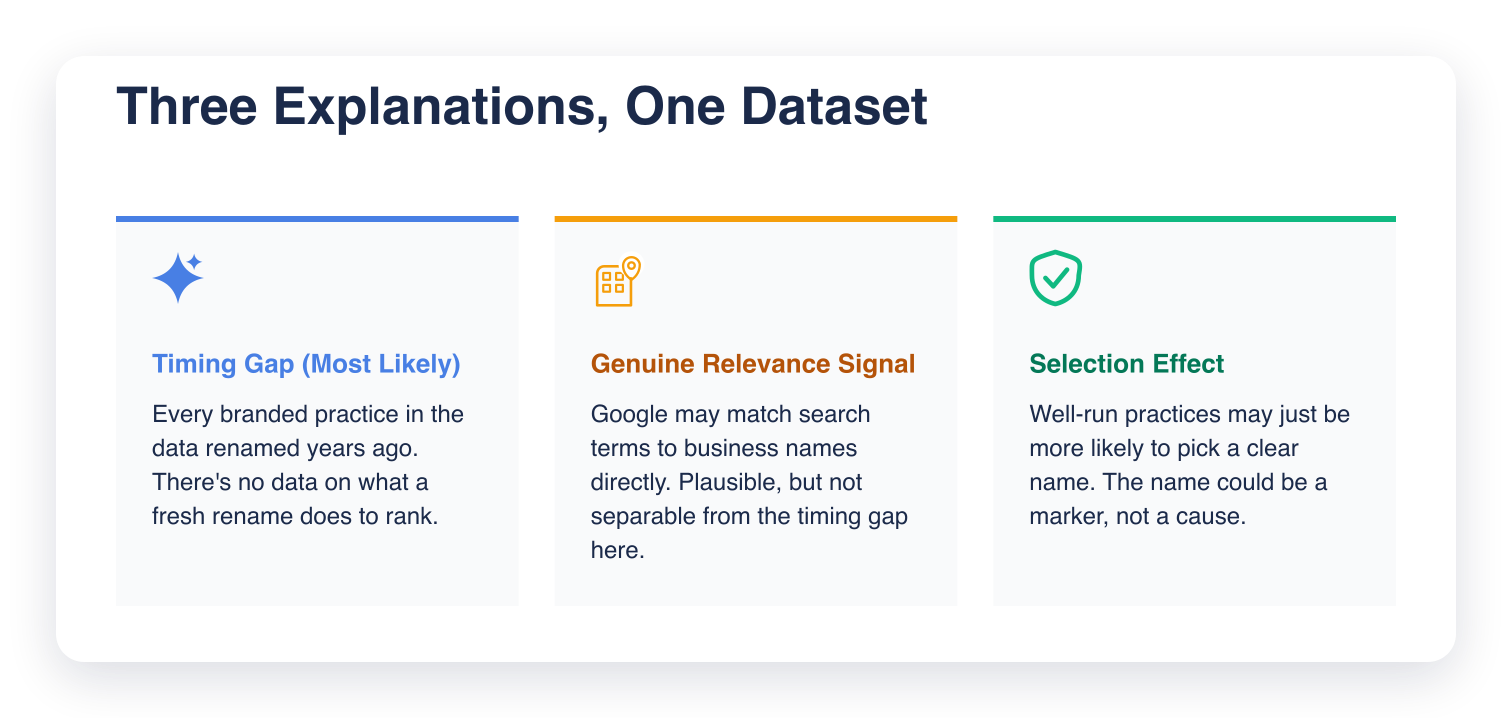
    Three cards showing the possible explanations: a timing gap in the data (most likely), a genuine relevance signal from Google matching search terms to names, and a selection effect where well-run practices simply pick clearer names

    The most likely explanation is the timing gap: every dental-branded practice in this dataset has carried that name for years, built citations, reviews, and local recognition around it. None of them are a business that just renamed last month, and we have no data on what happens to a practice's rank in the months after a rename, because renaming isn't something practices do often enough to sample. That's the actual advice question, and this dataset can't answer it.

    The other two explanations are plausible but harder to separate from that timing gap. Google matching search terms to business names is a well-documented mechanic, so if that's what's driving the effect, it's a real, causal one. It's also possible this is a selection effect: practices that already invest in clear naming and visibility tend to also do other things right, and the name may simply mark a well-run practice rather than cause its rank.

    What to Tell a Client

    The right advice depends on where a practice already stands: opening fresh, already established under a different name, or scaling across multiple locations.
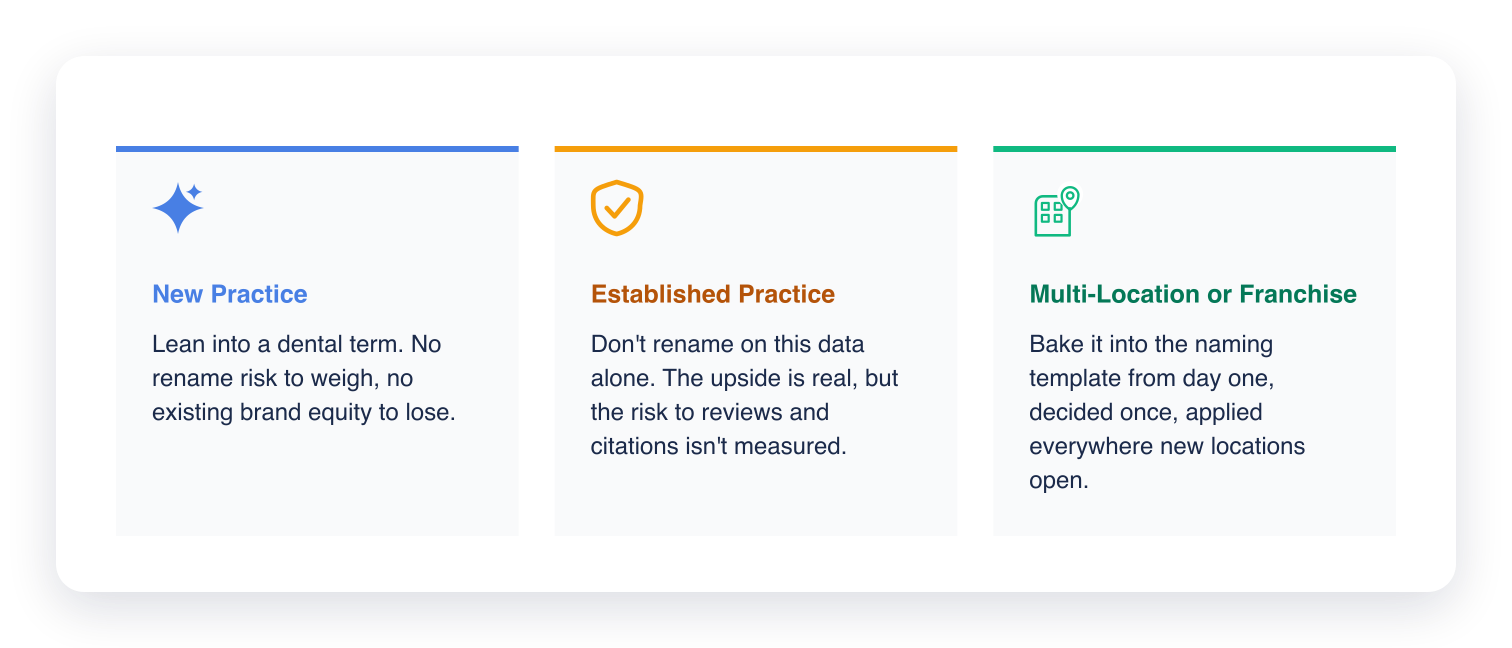
    What to tell a client: new practices should lean into a dental term, established practices shouldn't rename on this data alone, multi-location practices should include it in the naming template from day one

    Choosing a Name for a New Practice

    The data supports leaning toward a name that includes a clear dental or dentist term. There's no rename risk to weigh against, since there's no existing brand equity to lose.

    An Established Practice With Brand Equity in Its Current Name

    Don't rename on this data alone. The 2.25-position upside is real, but it's an average pulled from practices that have carried a dental-branded name for years. A rename risks review continuity, citation consistency, and existing brand recognition, none of which this dataset measures, and none of which come back quickly if a rename goes wrong.

    A Multi-Location or Franchise-Style Practice

    This is where the finding is most actionable, since naming convention gets decided once and applied everywhere new locations open. Including a dental term in the naming template from the start avoids the tradeoff entirely.

    One Caveat

    This is one attribute, measured cleanly, inside one dataset. It is not permission to keyword-stuff a business name past what a practice would naturally be called. Google's own guidelines for representing a business on Google state that a name "must reflect your business's real-world name" and that including unnecessary information, like a tagline or a descriptor added to chase relevance, isn't permitted and could result in the profile getting suspended. That's a real cost this data doesn't measure.

    If you're naming a practice today, a clear dental term helps and costs nothing. If you're renaming one that already has a name, you are trading a measured average for risks this data does not measure. That is the practice's call.

    See Where Your Own Practice Ranks

    If you're weighing this for a real practice, the same kind of grid-scan data behind this analysis is available for your own listing. Grid My Business shows exactly where a practice ranks against same-market competitors, name, category, and reviews included, so you can see the current position before deciding.

    Frequently Asked Questions (FAQs)

    Q: Does adding "dental" to a practice's name guarantee a rank improvement?

    A: No. It's a measured correlation across thousands of same-market comparisons, not a guarantee for any individual practice. Other factors, especially proximity to the searcher, matter more.

    Q: Should a brand-new dental practice pick a name with "dental" in it?

    A: Yes, this is the clearest case in the data. A new practice has no existing name or brand equity to protect, so there's no rename risk to weigh against the advantage, just a name choice made once at the start.

    Q: Should an established dental practice rename to include a dental term?

    A: Not on this data alone. The advantage is real, but the dataset only captures practices that have carried a dental-branded name for years. There's no data on what a rename does to an established practice's rank, reviews, or citations in the months after.

    Q: Is this the same as keyword stuffing?

    A: Not as measured here, since the comparison is presence of a natural dental term, not an artificially long or stuffed name. But a name that reads as an obvious ranking play carries its own risk that this dataset doesn't measure.

    Q: What matters more than the business name?

    A: Proximity to the searcher. It's the dominant factor in this dataset by a wide margin, and it sets the ceiling on what any other attribute, including the business name, can do.
  • The Embed Scan Widget Turns Website Traffic Into a Lead List

    The Embed Scan Widget Turns Website Traffic Into a Lead List

    Your website gets traffic every week: referrals, ad spend, content that ranks. Almost none of it turns into a lead.

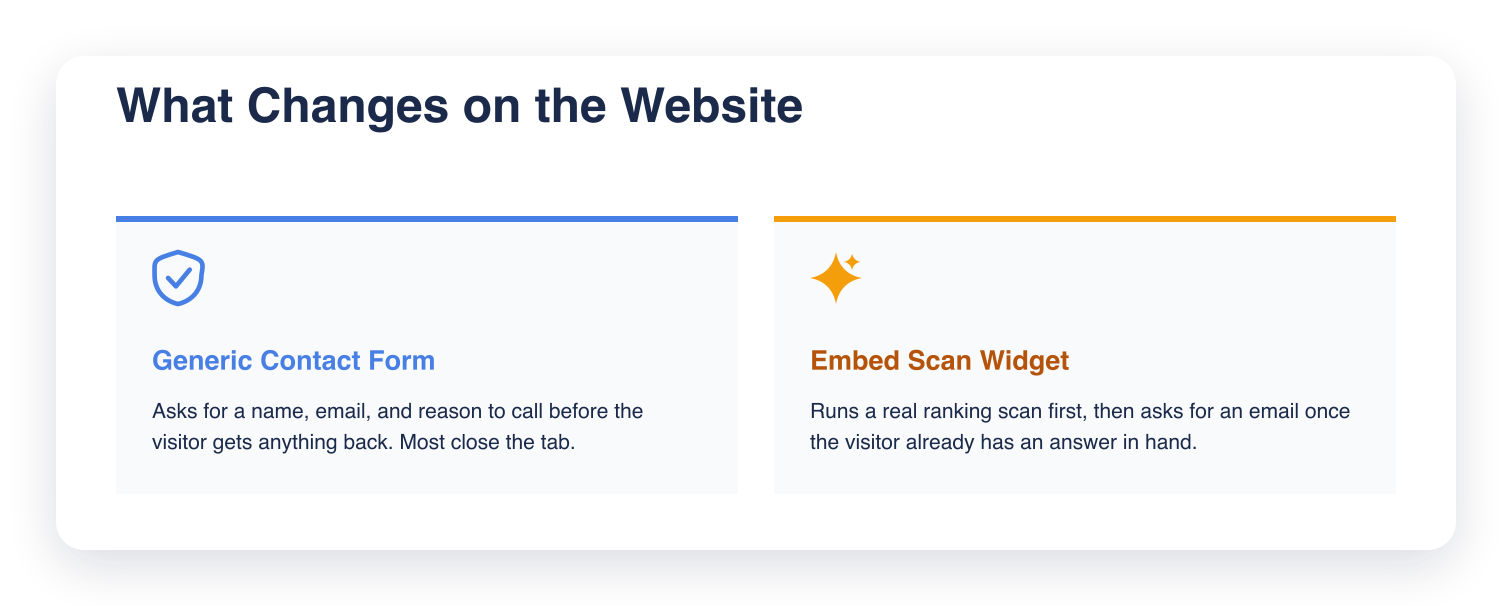
    Contact forms convert poorly because the visitor gets nothing in return. Most close the tab instead of filling one out.

    The Embed Scan Widget lets you drop a small, branded widget on your own site that runs a free ranking scan for a visitor and hands back a qualified lead in the process:

    Two cards contrasting a generic contact form with the Embed Scan Widget: the form asks for contact details before giving anything back, the widget runs a real ranking scan first and asks for an email after

    Why a Contact Form Loses Visitors You Already Paid For

    Every visitor on your site cost something to get there: content production, ad spend, a referral someone had to earn.

    A generic "contact us" form asks for a name, an email, and a reason to call, before the visitor has gotten anything back.

    Someone curious about their own Google ranking will run a scan before they'll ever fill out a contact form. That's the visitor the widget is built for.

    How the Embed Scan Widget Captures a Lead

    The widget gives the visitor something first: a real scan of where they rank. Instead of "tell us about your business," it offers a real answer to where this business stands.

    What the Visitor Sees

    A visitor drops in a Google Maps link, types a keyword, and enters an email. The widget runs a real ranking scan and shows the result immediately, no account and no waiting on a callback.

    Here's what that looks like:

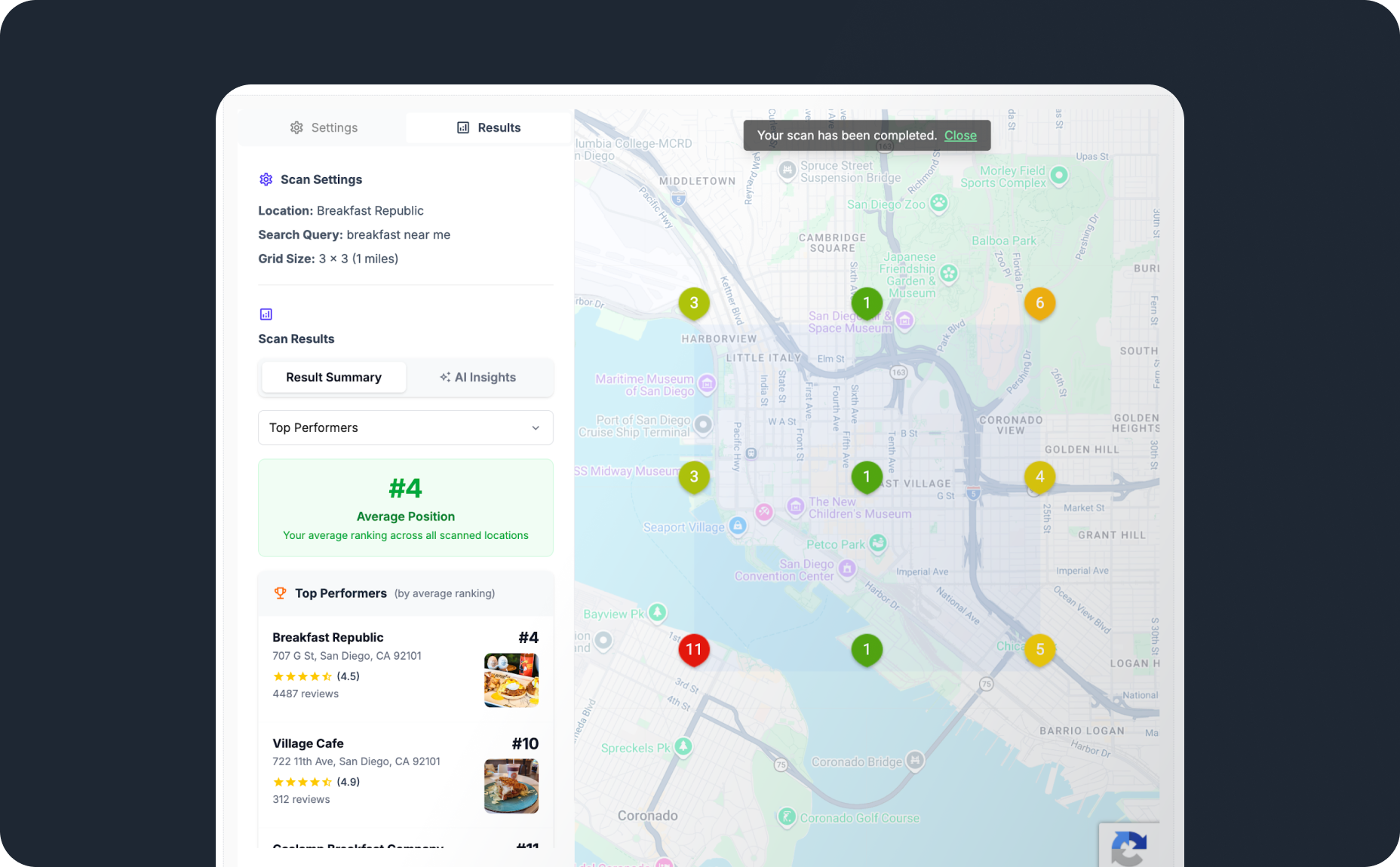
    The Embed Scan Widget's code snippet, a completed ranking scan with grid map and average position, and the widget rendered on a sample website

    What You Set Up

    Setup happens once, from the Embed page inside Grid My Business:

    • Create an embed key
    • Set a monthly scan limit for that key
    • Restrict the key to the domains allowed to run it
    • Paste the generated script into the site

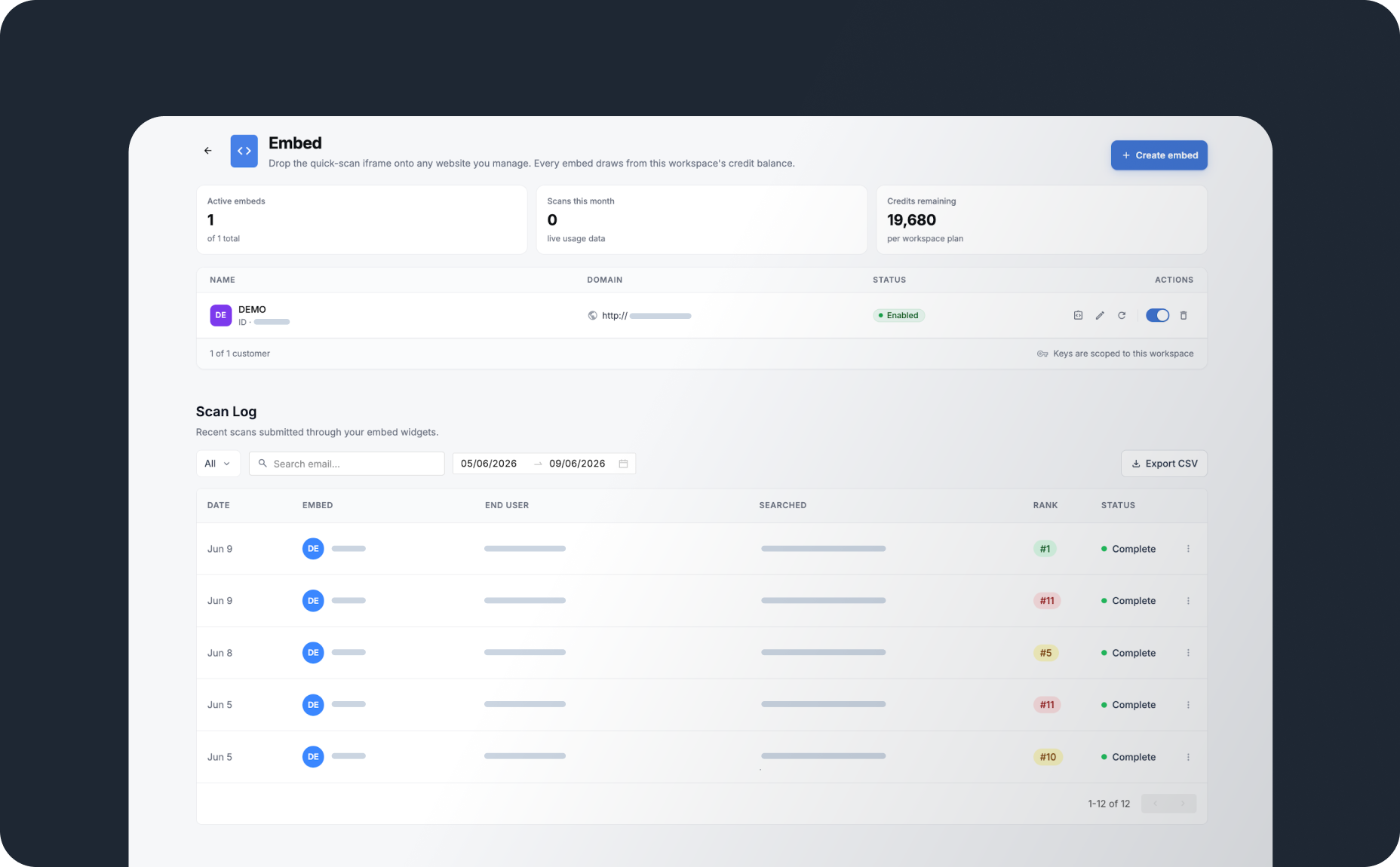
    Here's that setup screen inside Grid My Business, embed keys and scan log side by side:

    Grid My Business Embed page showing active embeds, scans this month, credits remaining, and the scan log below with captured leads by date, keyword searched, and rank

    Once the script is live, it runs on its own. No one has to check on it for it to keep working.

    What Happens to Every Lead the Widget Captures

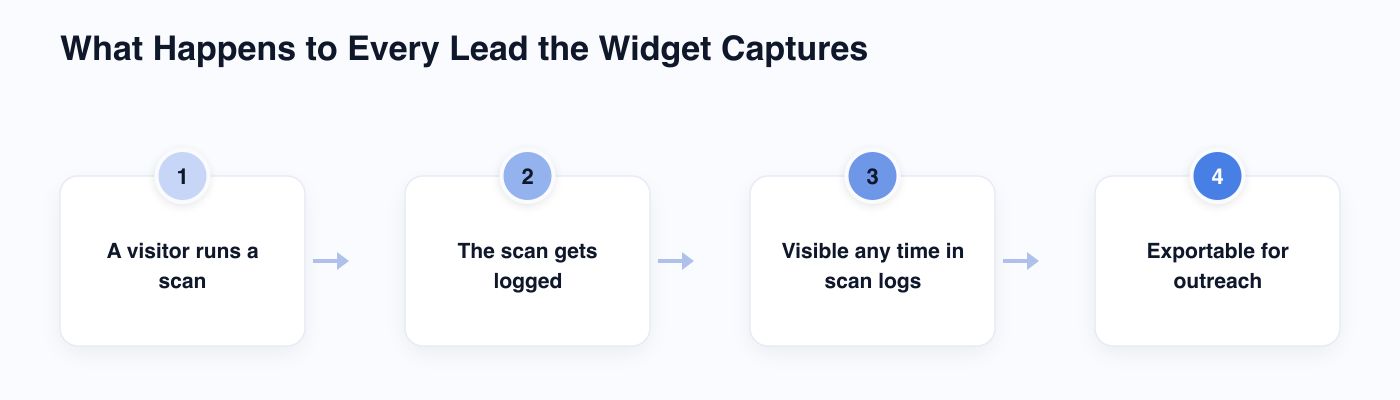
    The email address is only the start. Every scan gets logged, and the log is where the real lead list builds. Here's the path a captured lead follows:

    Four-step diagram: a visitor runs a scan, the scan gets logged, it stays visible any time in scan logs, and it's exportable for outreach

    Scan logs stay visible any time, not just the moment a scan runs. You can check them on your own schedule, on the same Embed page shown above, and see who ran a scan, what they searched, and how their business ranked.

    Leads can also be exported for outreach, so following up doesn't depend on remembering to check the widget every day.

    The Guardrails That Make It Safe to Leave Running

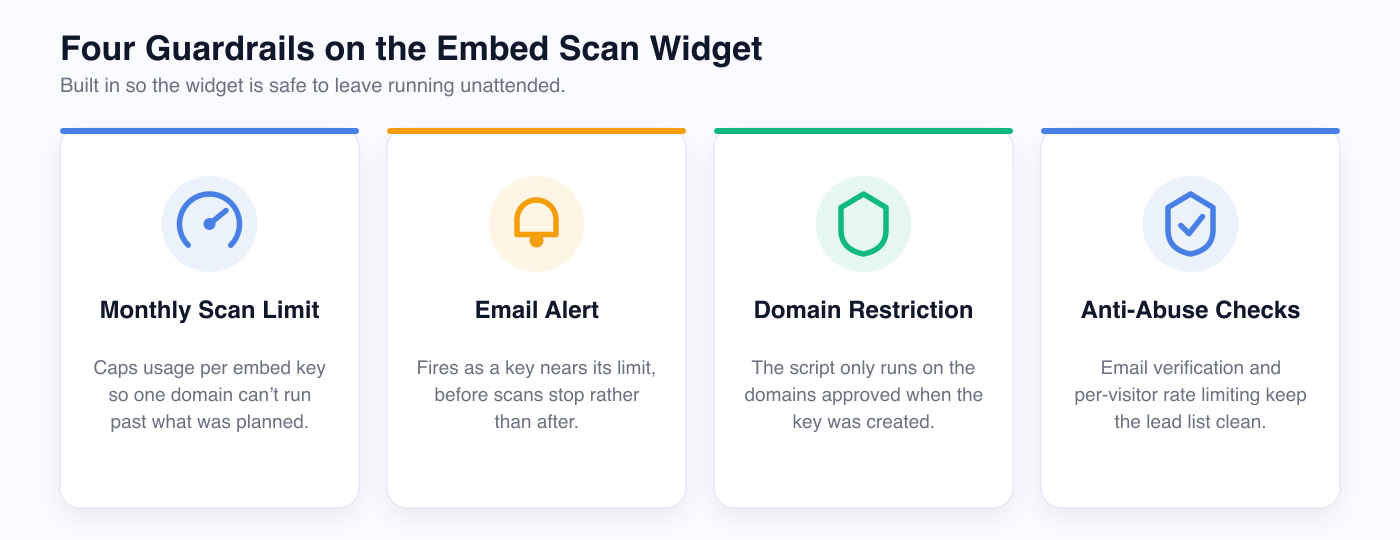
    A script sitting unattended on a public website needs limits, and the Embed Scan Widget ships with several:

    Four cards showing the widget's guardrails: monthly scan limit, email alert, domain restriction, and anti-abuse checks

    Each embed key carries its own monthly scan limit, so one domain can't run past what you planned for. An email alert fires as a key nears that limit, before scans stop.

    Domain restrictions keep the script working only where it was approved to run. Lifting the code and pasting it onto another site won't work.

    Anti-abuse checks cover what's left. Email verification and per-visitor rate limiting keep the lead list clean, without you sorting spam out of real leads.

    Wrapping Up

    The widget swaps a contact form's empty ask for a real ranking scan, then asks for an email once the visitor already has something in hand.

    If you're on the Scale or Dominate plan, you can create an embed key from the Embed page and have the widget live the same day.

    Frequently Asked Questions (FAQs)

    Q: Do I need a developer to install the Embed Scan Widget?

    A: Not really. You create the embed key inside Grid My Business, then paste one generated script into your site.

    Q: Can I run the widget on more than one website?

    A: Yes. Create a separate embed key for each domain, each with its own scan limit and domain restriction.

    Q: What happens once a key hits its monthly scan limit?

    A: Scans pause until the next cycle or until you raise the limit. You'll get an email alert as the key approaches that ceiling.

    Q: Where do the leads the widget captures show up?

    A: They land in your scan logs inside Grid My Business. You can check them any time and export the list whenever you're ready to follow up.

    Q: What plan includes the Embed Scan Widget?

    A: It ships with the Scale and Dominate plans.

  • AI assistants can now read your Grid My Business data

    AI assistants can now read your Grid My Business data

    Most of the time an agency spends on a client report has nothing to do with writing it. It's the twenty minutes before that: opening the dashboard, pulling this month's rankings, checking where a competitor moved, and pasting all of it somewhere the writing tool can see it.

    That step repeats for every report, every month.

    Connecting AI to local SEO data removes it. We built the MCP Server so an AI assistant reads the numbers directly, inside the same tool doing the drafting.

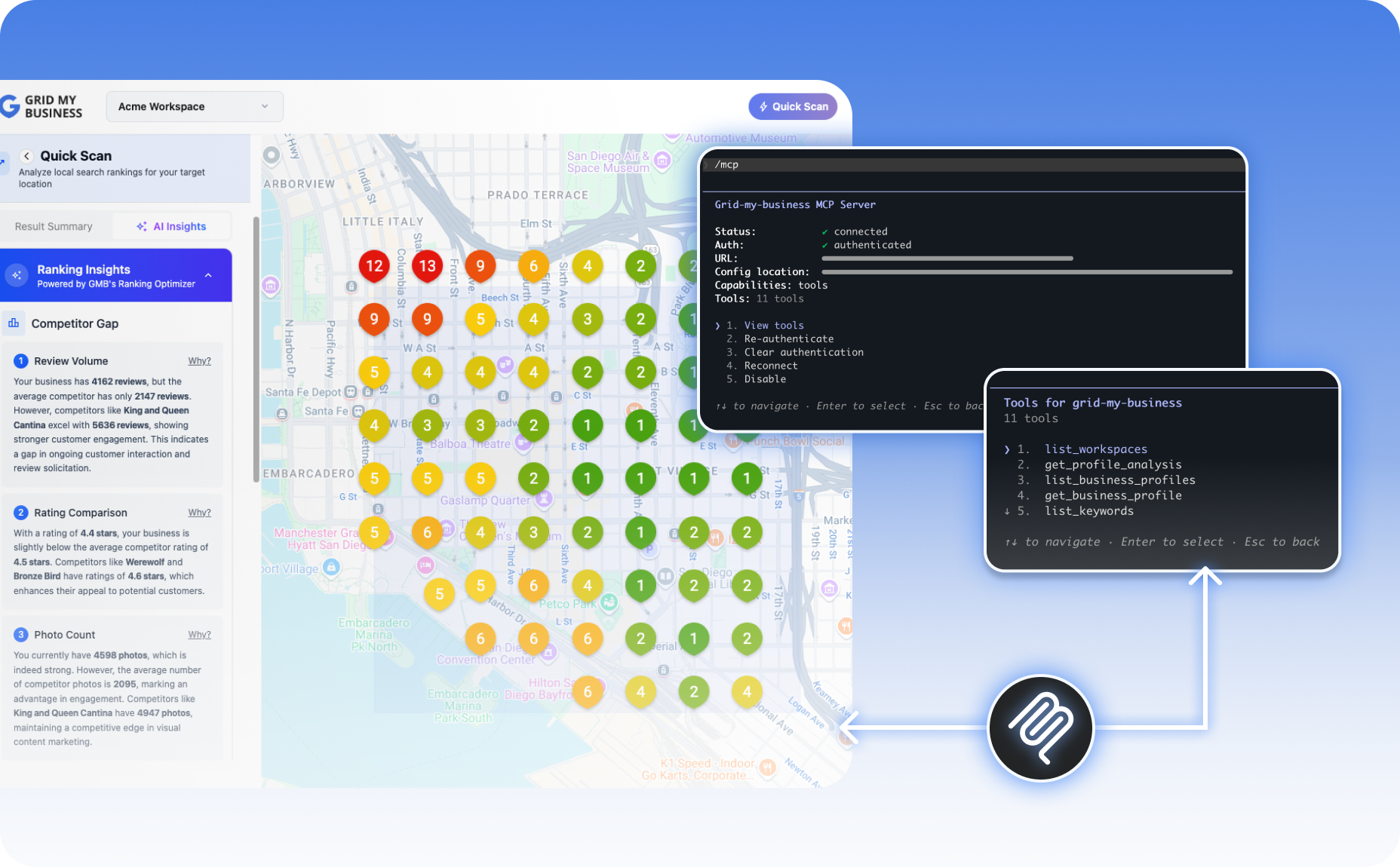
    Grid My Business MCP Server connected inside Claude Code, showing 11 available tools including list_workspaces, get_profile_analysis, and list_business_profiles

    Where Local SEO Report Time Goes

    Ask any agency owner how long a client report takes and they'll usually answer with the writing time. That's the part they notice.

    The part they don't notice as clearly is everything before it:

    • Pulling this month's rank positions
    • Checking where a competitor gained ground
    • Scanning for new reviews across every location
    • Copying performance numbers into a doc, a spreadsheet, or a prompt

    None of it is billable, and it repeats for every client, every reporting cycle.

    If you're running fifteen client accounts and gathering the data for one report takes fifteen minutes, that's three and a half hours a month spent on exporting before a single sentence gets written. At five clients that cost is manageable. At fifty, it shows up every single week.

    Connecting AI Tools to Your Local SEO Data

    The Grid My Business MCP Server gives AI assistants direct read access to account data. Once it's connected, an assistant can retrieve live numbers on request, without you opening a dashboard first.

    We built it to work across the tools agencies are already using to draft reports and manage client work:

    • Claude Desktop
    • Claude Code
    • Codex (IDE extension, CLI, and app)
    • Cursor
    • Antigravity

    If you already use one of these for drafting, you don't need to change tools or learn a new interface. The connection works inside the tool you already have open:

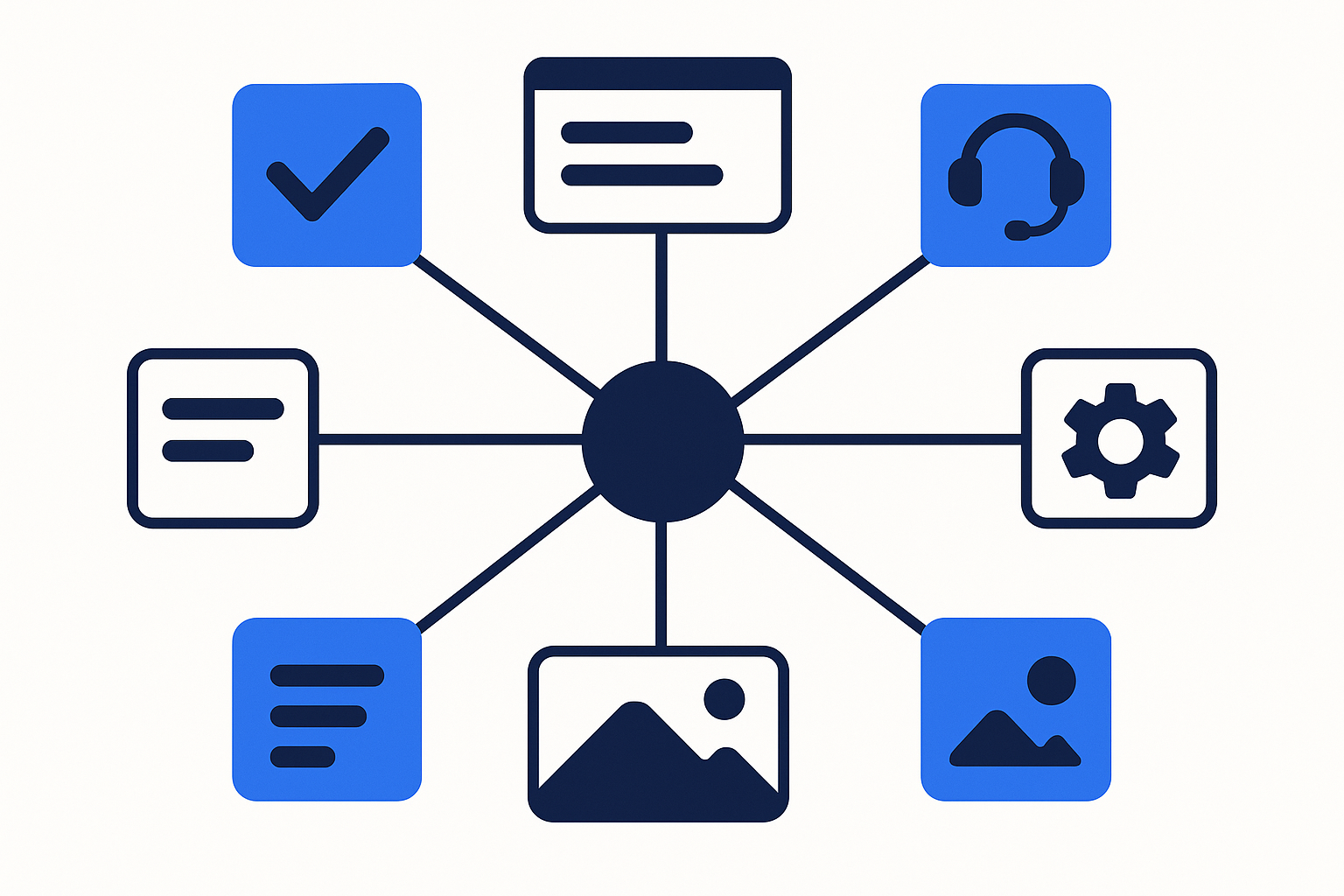
    One account connecting to five AI tools

    Access is read-only. The assistant can retrieve rankings, competitor data, and profile signals, but it can't edit a listing, change account settings, or touch anything you haven't already set up yourself. That matters if you're handing an AI tool a line into live client accounts.

    The connection also isn't limited to a single client. If you're running multiple workspaces, you can query across whichever location or client account you need, from the same conversation.

    What Data Is Accessible Through the Integration

    Access isn't limited to a single metric. The integration covers the categories that make up a local SEO report, so an assistant can answer full report questions.

    If you're preparing a monthly report, you can ask where a location stands before writing a single word:

    • Ranking data showing exactly where a location stands for its tracked keywords
    • Competitor positions revealing the gap between a client and their closest rival
    • Profile analysis identifying what's dragging down a client's GMB Score
    • Review sentiment summarizing the review story across a location without reading each one individually
    • Performance metrics showing calls and clicks the listing has driven, on demand

    Performance metrics are the most requested of these. A client asking "did the new listing photos do anything" used to mean logging in and checking manually. Now it's a question an assistant can answer directly, mid-conversation, using the same account data it already has access to.

    What This Looks Like in a Real Client Report

    Take a plumbing client with three locations, and walk through what changes.

    Several Browser Tabs for Every Report

    Building this month's report used to start the same way every time: log into Grid My Business, screenshot the rank grid for each location, export the review summary, cross-check the competitor who's been closing the gap, then paste all of it into whatever doc or prompt turns it into a client-ready report.

    Now It's One Request

    With the MCP Server connected, the opening step becomes a single request. You can ask the assistant directly: "Pull this month's rankings and review sentiment for all three locations, and flag any location where a competitor gained more than two positions."

    The assistant answers using the live account, the same data it would have taken several browser tabs to gather manually. What used to be fifteen minutes of exporting becomes one request, and you move straight to deciding what the numbers mean for the client, the part that needs a person.

    The report content is unchanged. The gathering time drops.

    What the Connection Doesn't Do

    The assistant retrieves the numbers, it doesn't decide what they mean. Whether a rank drop is worth flagging to a client, or whether a review sentiment shift points to a real service issue, is still a judgment call for the person running the account:

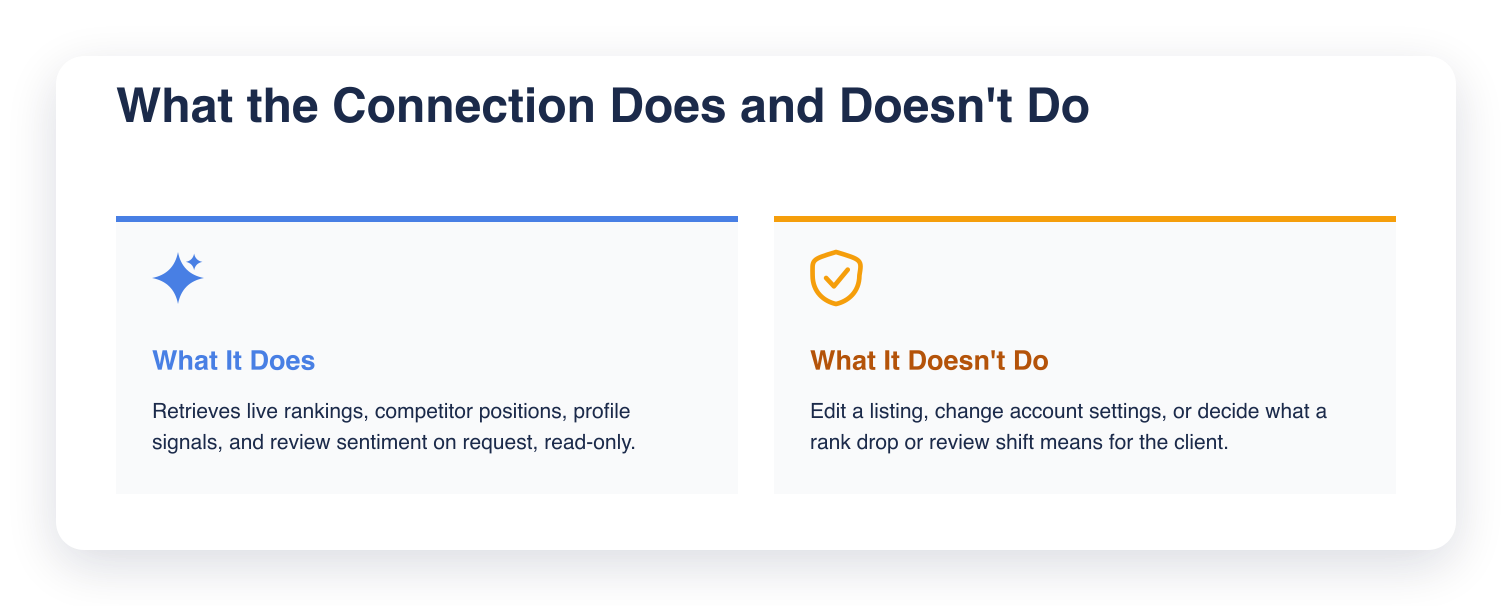
    Two cards showing MCP Server scope: what it does is retrieve rankings, competitor positions, profile signals, and review sentiment read-only; what it doesn't do is edit listings, change settings, or judge what the numbers mean

    The MCP Server removes the data-gathering step, not the analysis that comes after it.

    Setting Up the Connection Step by Step

    Setting up the connection doesn't require a new account or a separate login. It runs on top of the Grid My Business account you already have, and the exact step depends on which tool you're connecting.

    #1 Find the setup instructions for your tool at gridmybusiness.com/docs/mcp-server. Claude Code and Codex connect with a single CLI command; Claude Desktop, Cursor, and Antigravity connect by adding a short configuration snippet to that tool's config file.

    The three-step setup flow

    #2 Run the command or save the config file for your tool, then restart or reconnect if your tool requires it.

    #3 Ask for what you need, directly in the tool. "Pull this month's rankings for a client" or "What's dragging down this profile's GMB Score" both work as plain requests once the connection is live.

    From there, the export step is gone. If you're managing several locations, you can ask for one client's numbers, then the next, without opening a new tab for each. The assistant reads the account directly and you skip straight to the part of the report that needs a human: the analysis and the recommendation.

    Wrapping Up

    Setting up the MCP Server takes minutes and removes the export step from every report going forward.

    Connect it to Claude Desktop, Claude Code, Codex, Cursor, or Antigravity and that step goes away, without changing how your agency writes its reports. The assistant reads the account directly, with read-only access and no changes to your live data.

    If your team already drafts reports inside an AI tool, head to your Grid My Business dashboard and connect the MCP Server to see it pull live data on the first request.

    Frequently Asked Questions (FAQs)

    Q: How is the MCP Server different from exporting a CSV or PDF report?

    A: A CSV or PDF is a snapshot from the moment it was exported. The MCP Server gives an AI assistant a live connection, so the data it retrieves reflects the account at the moment of the request rather than whatever was last exported.

    Q: Will connecting the MCP Server slow down or affect my Grid My Business account?

    A: No. The connection only reads existing account data on request. It doesn't run new scans, change settings, or add any processing load beyond a standard data query.

    Q: Do I need technical or developer experience to set up the connection?

    A: No coding is required, but setup does involve either running one command (Claude Code, Codex) or pasting a short configuration snippet into a config file (Claude Desktop, Cursor, Antigravity). Full steps for each tool are at gridmybusiness.com/docs/mcp-server.

    Q: Can I disconnect the MCP Server if I no longer want an AI tool to access my data?

    A: Yes. Removing the command or configuration snippet from your AI tool ends its access to your account.

    Q: Does every team member need their own MCP connection, or can one connection serve a whole agency?

    A: Each connection is set up individually per tool, so check your AI tool's own settings for whether a connection applies per user or per workspace.

  • Why Legitimate Google Business Profiles Are Still Getting Suspended in 2026

    Why Legitimate Google Business Profiles Are Still Getting Suspended in 2026

    Google has been suspending Google Business Profiles (GBP) in waves since late April 2026. Three rounds of enforcement in under two months, and the suspensions have not stopped.

    Agencies with client documentation already on file recovered fastest.

    Three Enforcement Actions, One Pattern

    Wave 1 (April 27, 2026): Google suspended a large number of individual GBP listings overnight. Every affected profile received the same label: "Deceptive Content." Legal firms, medical practices, HVAC contractors, locksmiths, and garage door companies were hit hardest.

    Wave 2 (May 3, 2026): Six days later, Google escalated from suspending individual profiles to restricting entire Google accounts. A Google account is the login that manages all of a business's or agency's GBP listings. One account restriction takes down every profile under that account at once and blocks the ability to add or claim new listings.

    Wave 3 (Ongoing): Account-level instability has continued since May, affecting profiles with no prior violations.

    Three actions in under two months means this is ongoing.

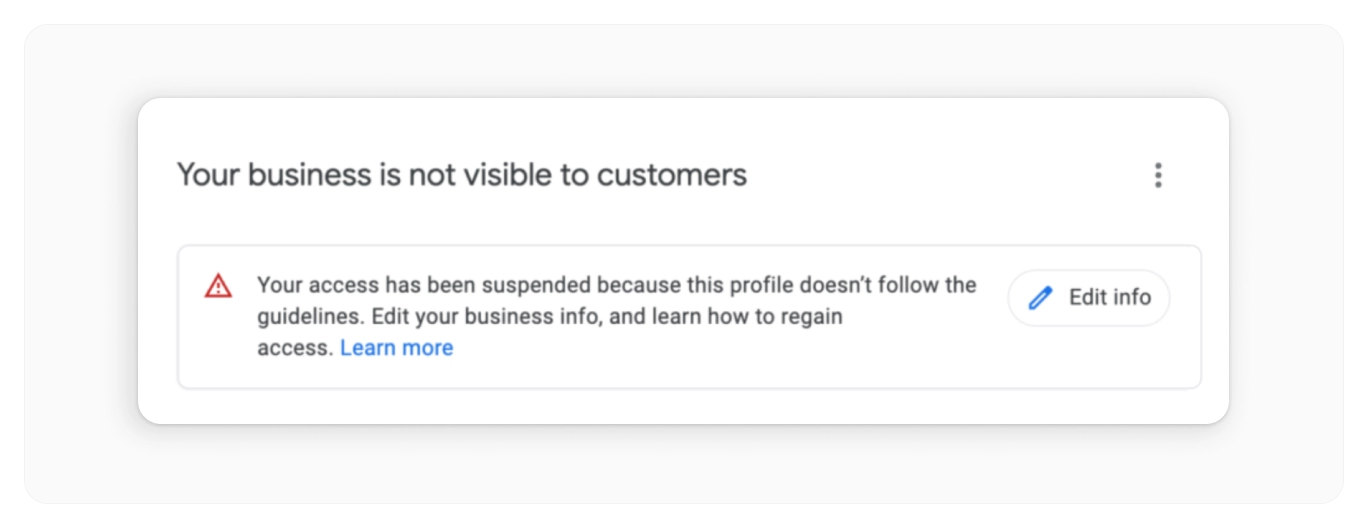
    Below is what a Wave 1 suspension looks like inside GBP Manager, the dashboard where businesses and agencies manage their listings:

    GBP Manager showing a suspended profile with the message: Your business is not visible to customers
    Source: OllyOlly

    The consequence is the same across all three waves: zero visibility in Google Maps until the restriction is lifted.

    Why Legitimate Profiles Are Getting Caught

    Google's automated enforcement flags profiles that share characteristics with known spam, regardless of intent.

    In high-spam verticals, legitimate businesses often share many of those same characteristics:

    • Service areas that cover unusually large geographic regions
    • Business names stuffed with keywords
    • A primary category that does not match the main service the business provides
    • Phone number formats that appear across clusters of suspicious listings

    Waves 2 and 3 appear to have added new triggers. Businesses running Local Services Ads (LSA) alongside their GBP have been disproportionately hit, suggesting Google may be connecting signals across both products.

    Businesses in highly competitive markets, particularly in California, are also being evaluated more strictly.

    Based on observed enforcement patterns, Google appears to be using Gemini AI to flag inconsistencies before enforcement takes place. If a business's name, address, or phone number on Google does not match what is on their website or other directories, it can be flagged before any human reviews the case.

    Two Suspension Types, Two Different Recovery Paths

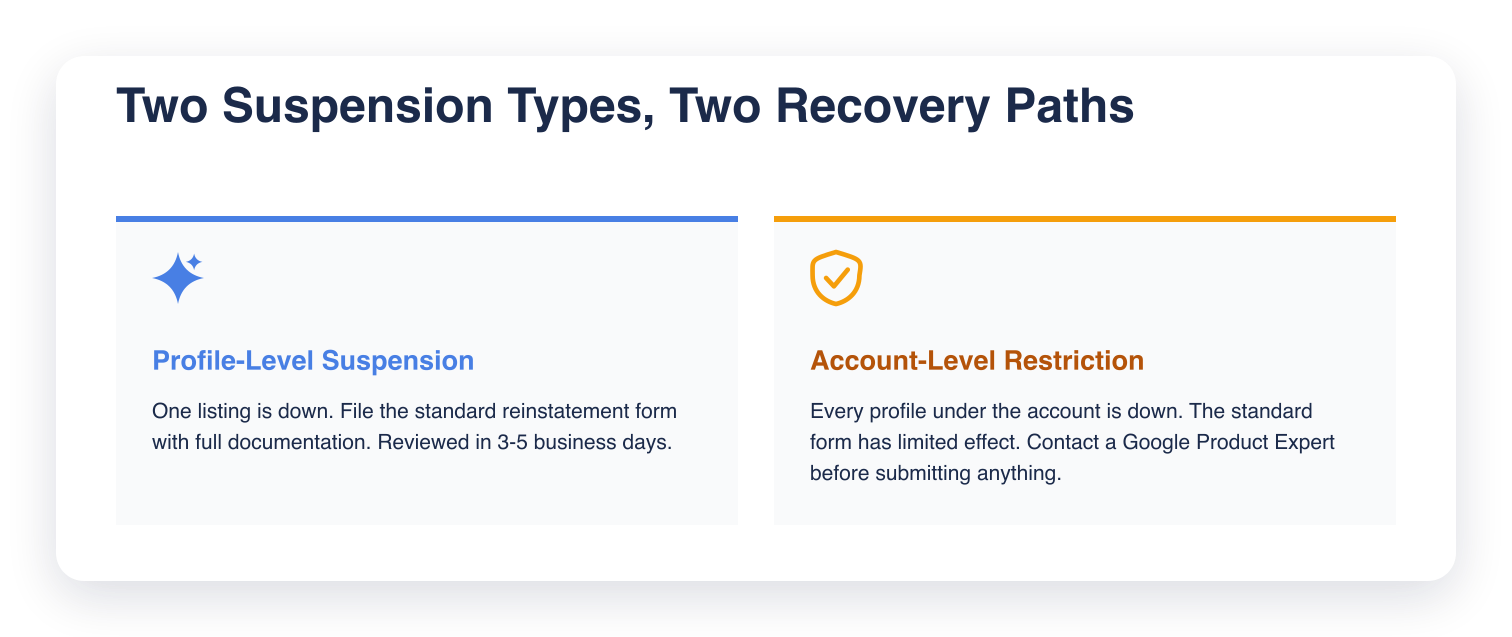
    How you appeal depends entirely on which type of action hit the account:

    Two cards comparing recovery paths: profile-level suspension gets the standard reinstatement form reviewed in 3-5 business days, account-level restriction needs a Google Product Expert contacted before submitting anything

    Profile-level suspension (Wave 1)

    One listing is suspended. The business still exists on Google, but this specific profile shows a violation notice and no longer appears in search results.

    The fix is the standard reinstatement form inside GBP Manager. Submit once, with complete documentation. A well-documented appeal is typically reviewed within three to five business days.

    What gets appeals approved:

    • Business documentation: government-issued business license, articles of incorporation, or equivalent registration
    • Address verification: utility bill, lease, or official correspondence at the registered location, dated within 12 months
    • Physical evidence: photos of signage, storefront, branded vehicles, or staff in uniform
    • Account history: when the Google account was created, when the profile was first verified, brief operating history

    The pattern that wastes the most time: a thin first submission, then a second with the same documents a few days later, then a third. Each resubmission resets the queue. The appeal was never going to clear without the documentation.

    Account-level restriction (Wave 2 and 3)

    Every profile under the account goes down at once. This is a different type of action entirely. The Google account itself has been restricted, not just one listing.

    The standard reinstatement form is widely reported to have limited effectiveness for these cases. Google Product Expert escalation is the recommended path.

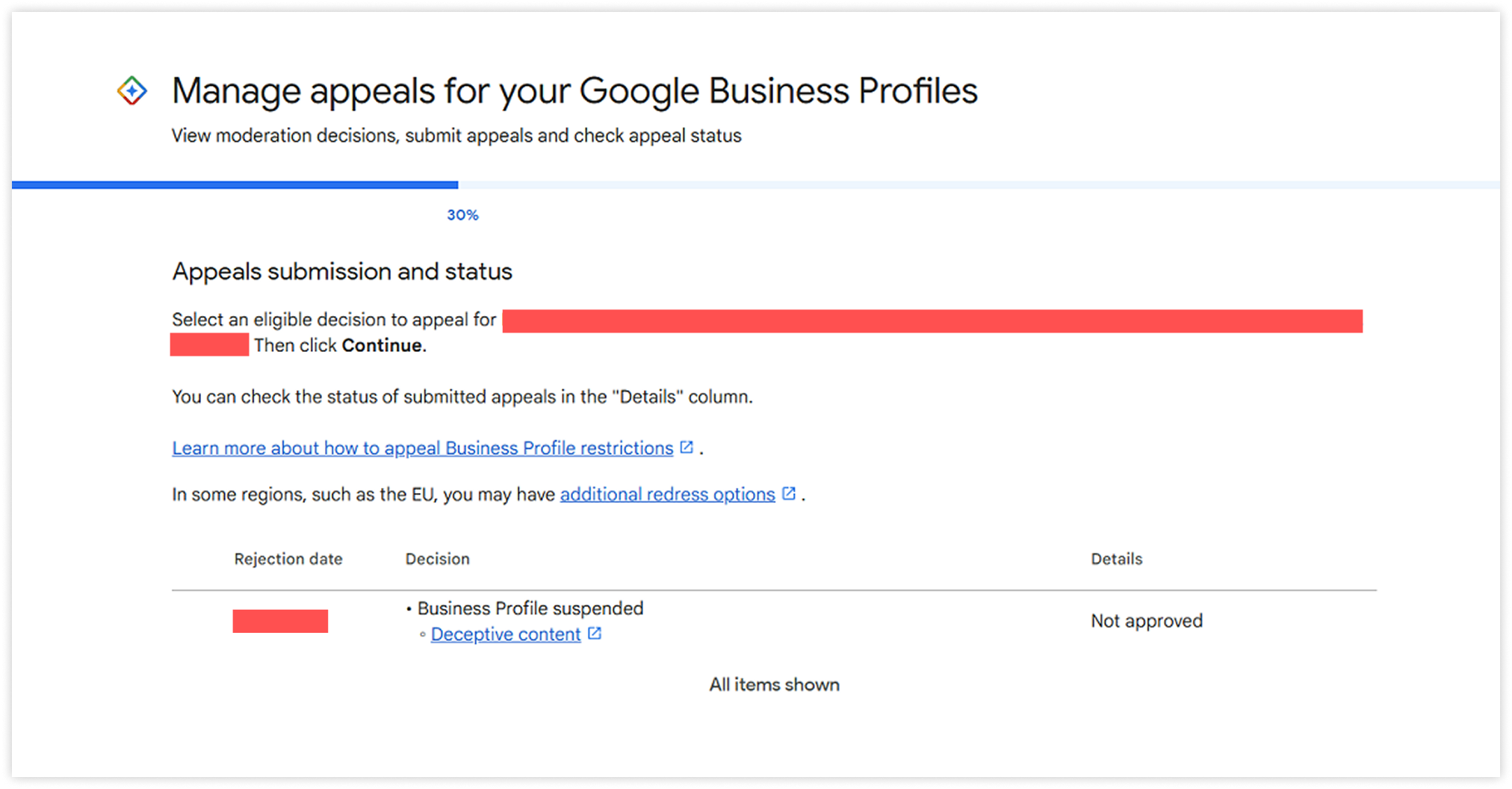
    Here is what the standard reinstatement form looks like before it routes to an account restriction case:

    Google appeals dashboard showing a Business Profile suspended for Deceptive content with a status of Not approved.

    Contact a Google Product Expert through the GBP community forum before submitting anything formally. Google Product Experts are trained community moderators who can confirm the correct channel and help avoid a submission that complicates the case.

    The Reinstatement Packet to Build Now

    Think of this as a client folder containing everything needed to file an appeal today, if a suspension hit tonight.

    Collect these documents while nothing is wrong. Asking a client for their business license mid-suspension is the slow way to do this.

    What to include for every client:

    • Business license or registration (most recent, government-issued)
    • Proof of address (utility bill or lease at the registered location, dated within 12 months)
    • Verification history (screenshot of when the GBP was first verified)
    • Google account record (the managing account email and when it was created)
    • Profile snapshot (current categories, business name, service area, phone number, hours)
    • Physical evidence (photos of signage, storefront, or branded materials)
    • Cross-platform consistency check (does the name, address, and phone number match exactly on the website, Google Ads, and LSA profiles?)
    • Operating history note (one paragraph: when the business opened, what it does, how long it has been a client)

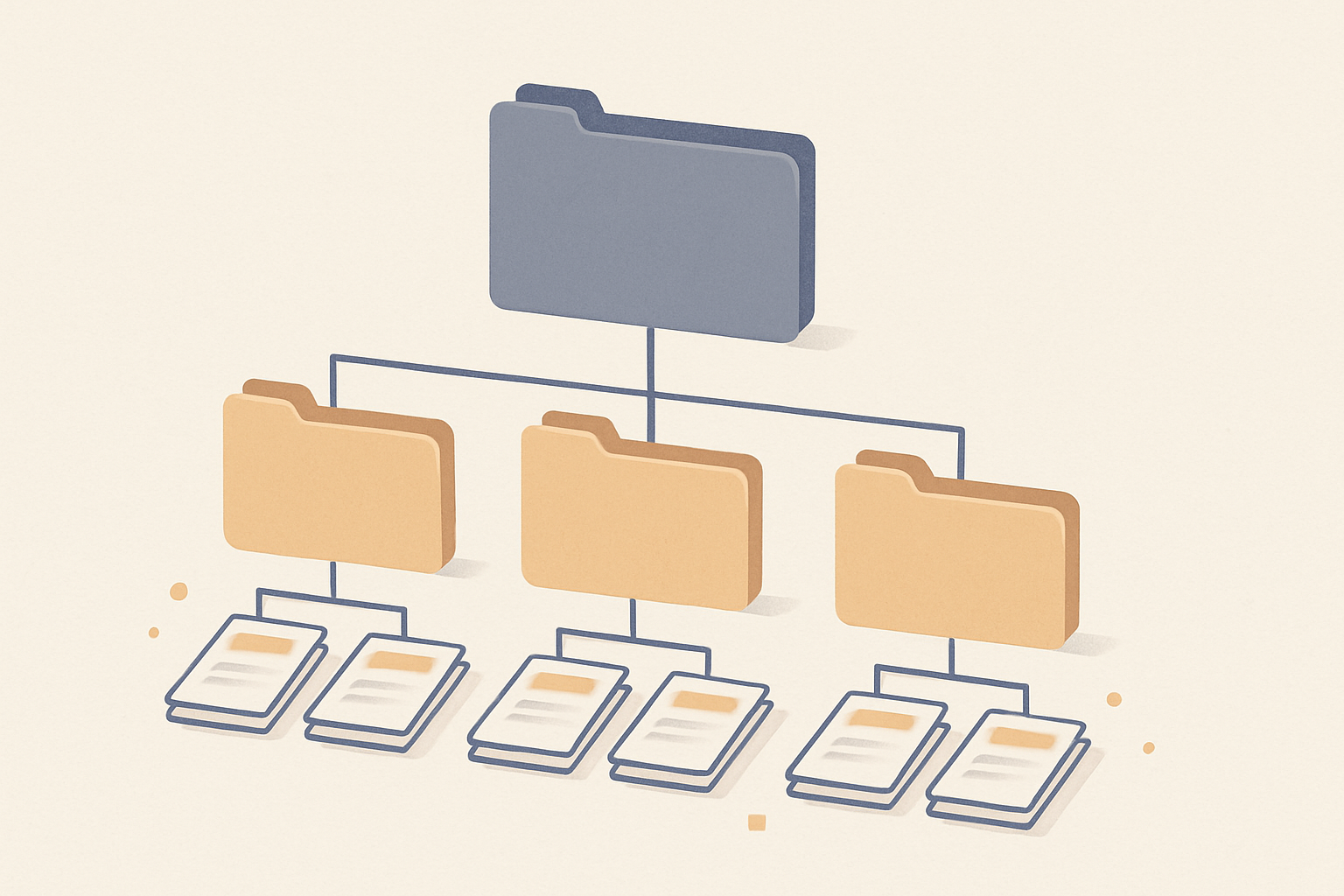
    An organized per-client folder makes this retrievable under pressure:

    A three-level folder hierarchy showing one top-level client folder with three subfolders, each containing stacked document sheets — illustrating an organized per-client documentation structure.

    Store it somewhere the whole team can access. Google Drive or Notion both work.

    Update the address verification document annually, and the profile snapshot whenever the profile changes.

    For multi-location clients, each location needs its own folder. A packet built for the flagship will not support an appeal for a satellite office.

    How to Spot a Suspension Before Your Client Does

    You will usually see it in rank first. By the time a client calls to say they have disappeared from Google Maps, time is already lost.

    The rank pattern shows which type it is before you open GBP Manager. A single-profile collapse in Grid My Business points to an individual suspension. A simultaneous collapse across all profiles under the same account points to an account restriction, and that distinction determines which recovery path you take.

    After any unexplained rank drop, check the profile status directly in GBP Manager. A suspended profile shows the violation notice on login. An account restriction shows at the account level before you reach any individual listing.

    Catching it the same day gives you time to route the appeal correctly before the client notices.

    Wrapping Up

    The enforcement that started on April 27 has not resolved. Three rounds in under two months, with Wave 3 still running, is a sustained shift in how Google is policing GBP.

    Build the reinstatement packet for every client this week. Know which account manages which profiles. Confirm business information matches exactly across Google, the website, and any ad platforms.

    Frequently Asked Questions (FAQs)

    Q: Can a GBP be re-suspended after reinstatement?

    A: Yes. Reinstatement does not guarantee the profile will not be flagged again if the signals that triggered the original action were not addressed. After reinstatement, run a cross-platform consistency audit and update the documentation packet before considering the case closed.

    Q: Should you use one Google account to manage all client profiles?

    A: Using a single account to manage every client creates significant risk. If that account is restricted under a Wave 2 or 3 type action, every client profile it manages goes down at once. Separating clients into individual or clearly segmented accounts limits the blast radius of any single enforcement action.

    Q: Can changing profile information while an appeal is pending hurt the case?

    A: Yes. Editing a suspended profile during an active appeal can reset the review queue or introduce new inconsistencies that complicate the case. Submit the appeal with the profile in its current state and hold off on any changes until the restriction is lifted.

    Q: How often should the reinstatement packet be updated?

    A: Update the address verification document annually and the profile snapshot any time the business changes its name, categories, service area, or phone number. Build both into your regular client check-in cadence so the packet is ready when you need it.

    Q: What should you tell clients while an appeal is in progress?

    A: Be direct about the timeline: profile-level suspensions take three to five business days, account-level restrictions are less predictable. Tell clients the profile is under review with Google, avoid speculating on the outcome, and set a check-in date.

  • GBP Primary Category: The Audit That Moves Rank

    GBP Primary Category: The Audit That Moves Rank

    Most agencies audit the obvious things. Reviews, citations, photos, NAP consistency. Primary category outweighs all of them and usually gets set once at onboarding and never reviewed.

    Primary category is the single most heavily weighted optimizable signal in Google's local ranking algorithm. The majority of profiles are in the wrong one.

    This guide covers auditing an existing profile's category. If you manage GBP profiles for clients, here is how to check whether their primary category is costing them rank, and how to fix it.

    Why Primary Category Carries More Weight Than Anything Else

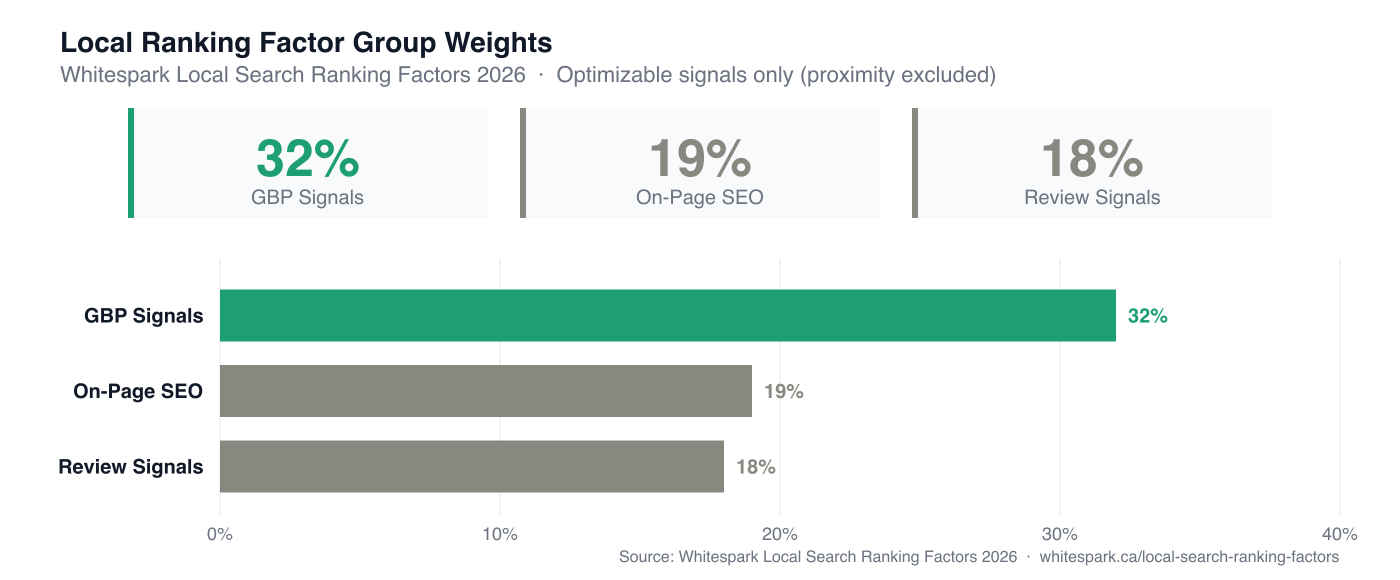
    GBP signal weighting = 32% of local ranking weight, according to Whitespark's 2026 Local Search Ranking Factors report. Within that group, primary category is ranked the single most important individual signal.

    When Google evaluates a profile for a query, it first determines relevance: does this business compete for this search at all? Primary category is the mechanism that answers that question. Category determines which queries a profile is eligible to rank for in the first place.

    Proximity — how close the searcher is to the business — is Google's single largest ranking factor overall. Proximity can't be changed. Category can, which is why it is the highest-leverage signal on the list of things you can change.

    Get it wrong, and no amount of review velocity or citation building will compensate, because the profile isn't in the pool at all.

    The Whitespark 2026 Local Search Ranking Factors report breaks down how the weight is distributed across factor groups:

    Bar chart of local ranking factor group weights, Whitespark 2026.
    Local ranking factor group weights, Whitespark Local Search Ranking Factors 2026. Optimizable signals only; proximity is Google-controlled and excluded.

    Check What Your Client Is Currently Listed As

    Open the profile in Google Business Profile Manager and navigate to Edit Profile. The primary category sits at the top of the Info tab. Write it down before you change anything.

    The most common finding at this step: the category was chosen by whoever set up the account, reflects the broadest possible description of the business, and has not been reviewed since.

    For multi-location clients, check each location individually. Category assignments do not inherit from a parent account. Each profile competes on its own.

    Map the Dominant Service, Not the Broadest One

    Primary category should reflect the service that drives the most search demand, even if that isn't the full scope of what the business offers. That is what "specific over generic" means in practice, and the practical part is defining "specific." If a client does HVAC and plumbing, the primary category is whichever vertical generates more local search volume in their market. To find that: pull the core service terms for each vertical into Google Keyword Planner filtered to the business's city or metro and compare monthly search volumes. If the client has Search Console history, filter by location and compare click volume per service cluster. Either gives you a defensible answer; the Keyword Planner route works even for prospects with no GSC access.

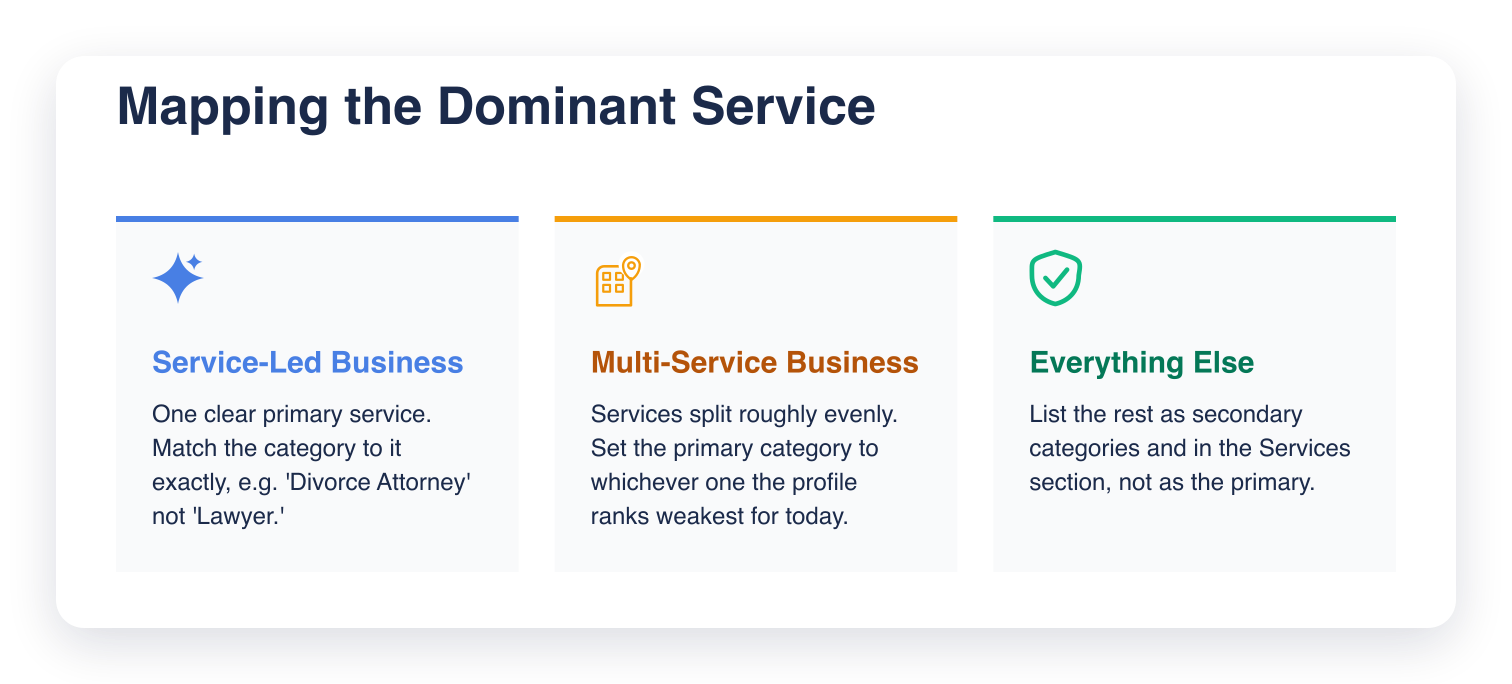
    Service-led businesses

    If the business has one clear primary service, the choice is straightforward. A divorce attorney should be listed as "Divorce Attorney," not "Lawyer." A nail salon should be "Nail Salon," not "Beauty Salon." The more specific the category, the smaller the competitive pool and the tighter the relevance match.

    Multi-service businesses

    If the business genuinely spans multiple services at roughly equal volume, make a call based on where the profile is weakest relative to competitors. If they rank well for service A and poorly for service B, lean the primary category toward B and shift A to secondary.

    This is a judgment call. It is also revisable. See the verification step below.

    Here's how to choose depending on which type of business you're auditing:

    Three cards showing how to choose a primary category by business type: service-led businesses match the category exactly, multi-service businesses pick whichever service ranks weakest today, everything else goes into secondary categories or Services

    Check What the Top-Ranked Competitors Are Using

    Search the client's target keyword in Google Maps, then open the top three to five profiles in the local pack and note each one's primary category. Most audit guides skip this step, and it is the most useful one in the list.

    You are looking for two things:

    • The pattern: if four out of five top-ranked profiles share the same primary category, that is a strong signal that Google's algorithm associates that category with the query.
    • The outlier: if one top-ranked profile uses a different category and still ranks, check whether they are compensating with exceptional review volume or proximity.

    This step also reveals category options you may not have considered. Google's taxonomy has more than 4,000 categories. Competitive research surfaces which ones are working in a given vertical and market.

    Cross-Reference Against Google's Taxonomy

    Once you have a target category from the previous two steps, confirm it exists exactly in Google's taxonomy before changing anything.

    Search for the category name directly in the GBP category field. Google autocompletes from its live list, showing available exact matches as you type.

    If the exact term does not appear, try variations.

    Two common mistakes here:

    • Choosing a near-match when the exact category exists. "Restaurant" when "Italian Restaurant" is available. "Contractor" when "General Contractor" is in the list. The exact match carries stronger relevance signal.
    • Choosing an exact match that is too niche. Some categories are so specific they carry no meaningful search volume. If Google's autocomplete surfaces it but competitive research shows nobody ranks with it, treat that as a warning sign.

    When no exact or near-exact match exists, choose the most specific available option and compensate with service descriptions and attributes.

    What the Audit Looks Like in Practice

    An HVAC and plumbing contractor was ranking outside the top 10 in the local pack for HVAC-related searches despite strong review velocity and a well-maintained profile. The primary category was "Plumbing Contractor" — chosen at account setup, unchanged since.

    Competitor audit: the top five local pack results for AC repair in that market were all listed as "HVAC Contractor." One used "Air Conditioning Contractor." None used "Plumbing Contractor."

    Keyword Planner confirmed HVAC terms generated roughly twice the local monthly search volume as plumbing terms in that city. The profile was ranking well for plumbing already. The category still matched the service the client had already won, and missed the one they were losing.

    The fix: primary category changed to "HVAC Contractor," "Plumbing Contractor" moved to secondary.

    Two weeks later, the before/after grid scan showed rank movement into the top 5 across the central and northern zones of the service area for HVAC searches. The strongest gains were closest to the business address, which is typical. The category correction does not override proximity. It removes the relevance block that was keeping the profile out of the pool. Plumbing rank held flat. The secondary category preserved it.

    The audit is looking for the category that Google already associates with the queries the client wants to rank for.

    How to Verify the Impact After You Change It

    Google typically re-indexes a profile within 7 to 14 days of a primary category change. Make the change, then give it that full window before you judge anything: rank shifts surface across the full two weeks.

    To measure impact properly, run a grid scan before the change and another 14 days after. A grid scan shows rank across a geographic grid of points, not a single position number. Category changes tend to produce uneven shifts. They tend to be stronger in some parts of the service area than others, and a single-point rank check will miss that:

    A geo-grid scan in Grid My Business showing rank across a grid of points over a service area.
    A geo-grid scan in Grid My Business. Rank is shown across a grid of points over the service area.

    Grid My Business runs geo-grid scans that let you compare rank distribution before and after a change. It is the cleanest way to see whether the category correction moved anything.

    One caution: do not change the primary category again if rank does not move immediately. Give it the full two weeks. Frequent category changes can trigger a review flag on the profile.

    Secondary Categories: How Many Is Too Many

    Google allows up to nine secondary categories, but adding all nine dilutes the signal your primary category sends. Google uses the full category set to understand the business. If you add eight categories that point in different directions, Google's interpretation of relevance gets less precise.

    The 2026 best practice: two to three secondary categories, tightly related to the primary. They should describe services that genuinely complement the main offering.

    If a client has a long list of services, use the Services section of GBP to describe them. Use categories for search relevance and the Services section for the full list of services.

    Wrapping Up

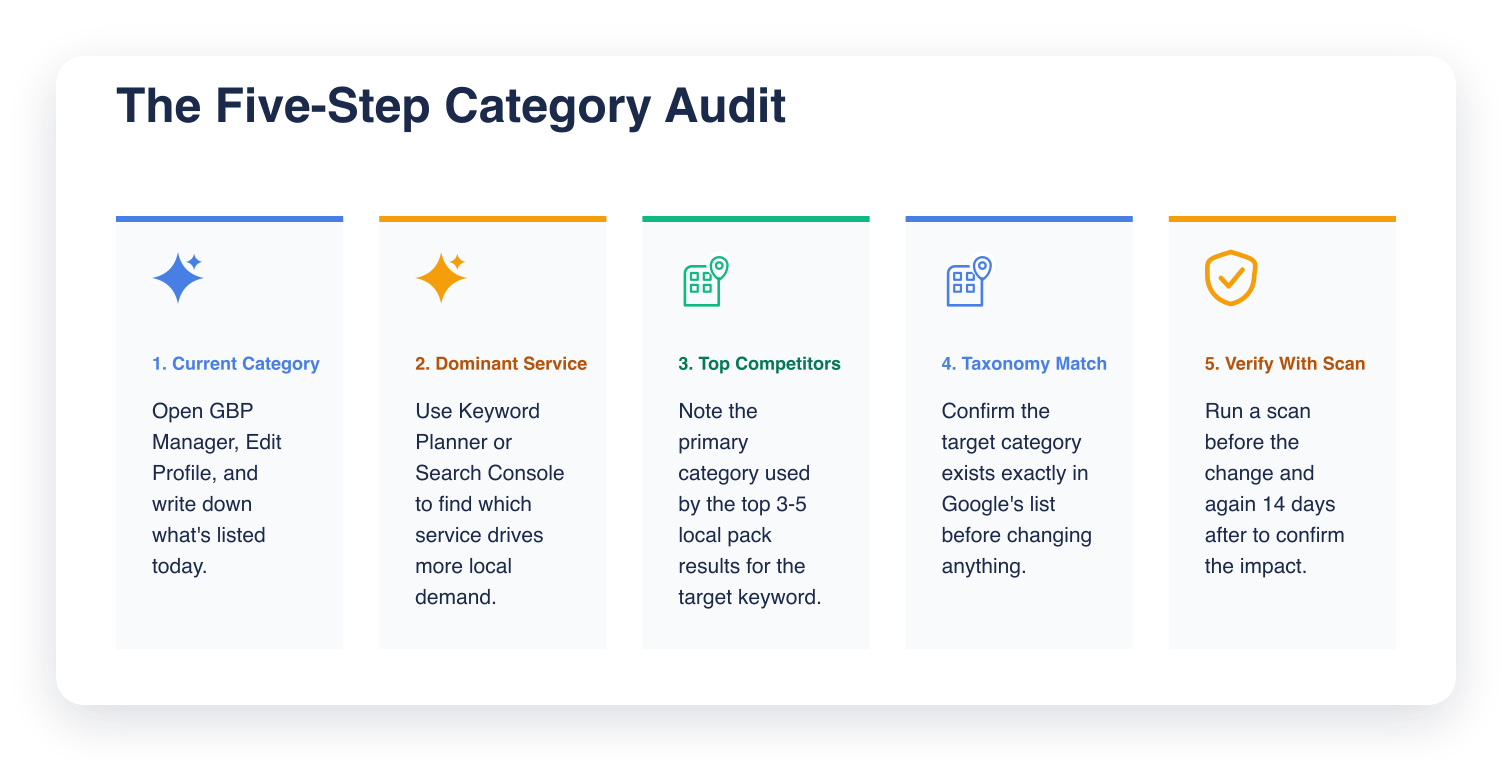
    The audit is five steps: check what the profile is currently listed as, map the dominant service, research what the top-ranked competitors in the local pack are using, cross-reference against Google's taxonomy, and verify rank impact after the change with a grid scan.

    Five cards summarizing the category audit steps: check current category, map dominant service, check top competitors, confirm taxonomy match, verify with a grid scan

    Run this across a client roster and you will keep finding the same pattern: profiles sitting in a category broader than the business competes in. The fix is usually one change, confirmed by a grid scan two weeks later.

    If you are not already tracking rank across the service area before and after changes, Grid My Business shows rank across the whole service area.

    Frequently Asked Questions (FAQs)

    Q: Does changing a primary category reset my Google Business Profile ranking?

    A: No. A category change does not reset your profile or erase accumulated signals like reviews and citations. It changes which queries your profile competes for and how relevant Google considers you for those queries. Rank typically shifts within 7 to 14 days.

    Q: Can I have the same primary category as my competitor?

    A: Yes, and in most cases you should. If the top-ranked profiles in your vertical are all using the same primary category, that category is what Google associates with those queries. Differentiating on category to avoid competition usually backfires. It removes you from the pool entirely.

    Q: How often should I review a client's primary category?

    A: At minimum, quarterly. Also review it when the client expands or changes their service mix, when a new competitor enters the local pack, or when rank drops without a clear explanation. Category misfit is one of the first things to check when a profile starts slipping.

    Q: Does primary category matter more for service area businesses or storefronts?

    A: Both. The mechanism is the same: primary category sets relevance for the queries Google will consider the profile for. Service area businesses may see a wider geographic rank distribution shift after a category correction because they are not anchored to a single address.

    Q: What should I do if no category in Google's list exactly matches my client's business?

    A: Choose the most specific available option that accurately describes the dominant service. Do not force an exact-sounding match that misrepresents the business. Use the Services section and business description to provide the specificity that the category cannot. Google cross-references all of these signals.