Most agencies audit the obvious things. Reviews, citations, photos, NAP consistency. Primary category outweighs all of them and usually gets set once at onboarding and never reviewed.
Primary category is the single most heavily weighted optimizable signal in Google's local ranking algorithm. The majority of profiles are in the wrong one.
This guide covers auditing an existing profile's category. If you manage GBP profiles for clients, here is how to check whether their primary category is costing them rank, and how to fix it.
Why Primary Category Carries More Weight Than Anything Else
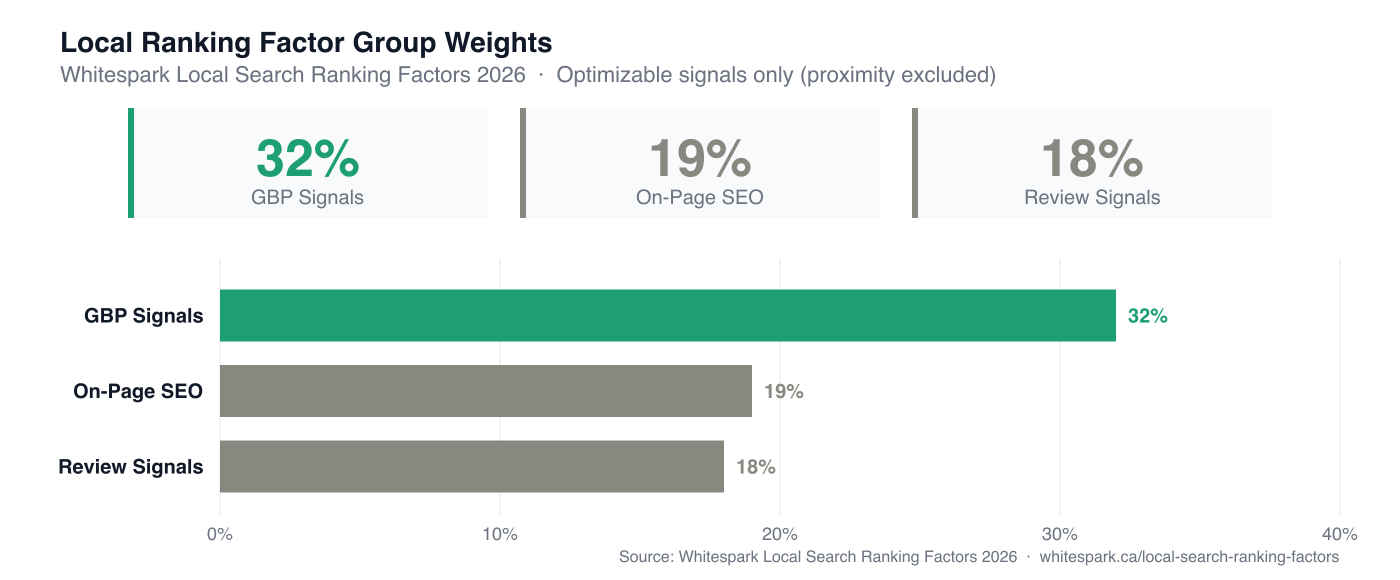
GBP signal weighting = 32% of local ranking weight, according to Whitespark's 2026 Local Search Ranking Factors report. Within that group, primary category is ranked the single most important individual signal.
When Google evaluates a profile for a query, it first determines relevance: does this business compete for this search at all? Primary category is the mechanism that answers that question. Category determines which queries a profile is eligible to rank for in the first place.
Proximity — how close the searcher is to the business — is Google's single largest ranking factor overall. Proximity can't be changed. Category can, which is why it is the highest-leverage signal on the list of things you can change.
Get it wrong, and no amount of review velocity or citation building will compensate, because the profile isn't in the pool at all.
The Whitespark 2026 Local Search Ranking Factors report breaks down how the weight is distributed across factor groups:
Check What Your Client Is Currently Listed As
Open the profile in Google Business Profile Manager and navigate to Edit Profile. The primary category sits at the top of the Info tab. Write it down before you change anything.
The most common finding at this step: the category was chosen by whoever set up the account, reflects the broadest possible description of the business, and has not been reviewed since.
For multi-location clients, check each location individually. Category assignments do not inherit from a parent account. Each profile competes on its own.
Map the Dominant Service, Not the Broadest One
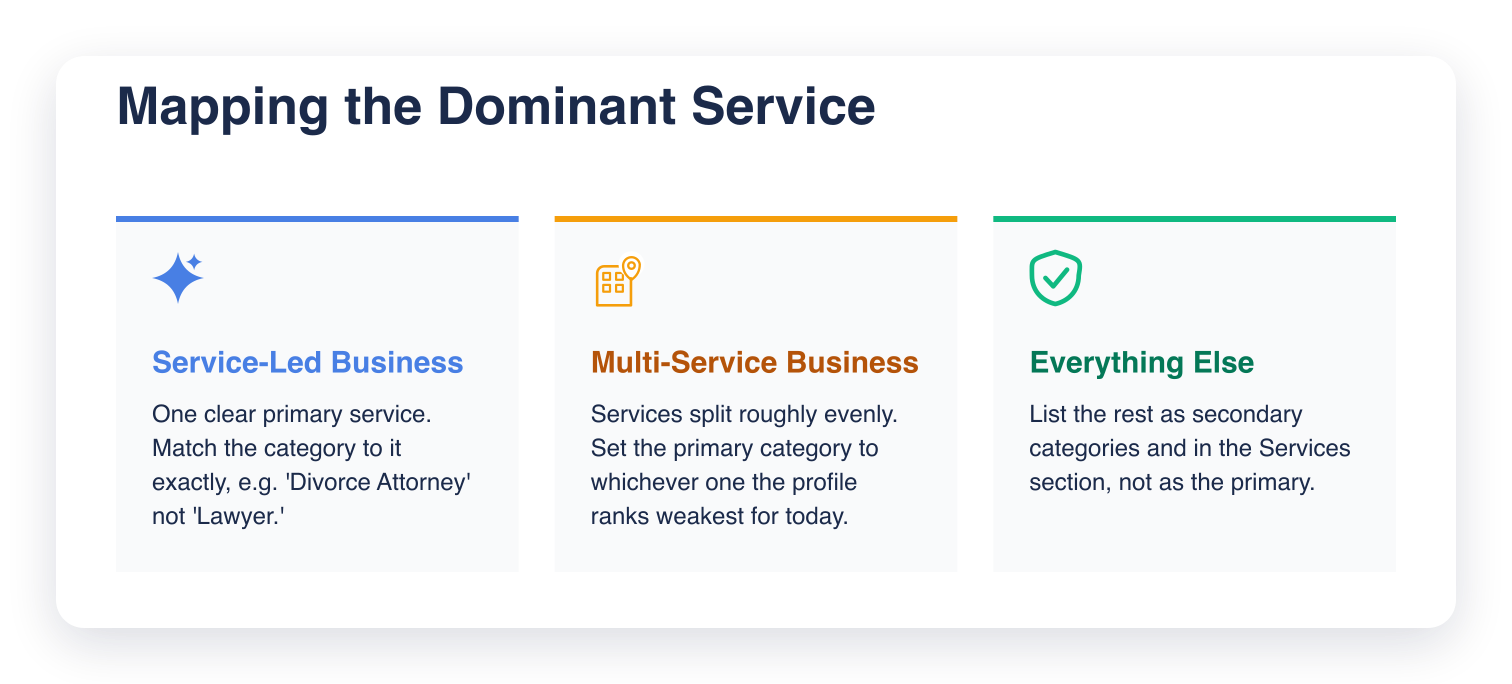
Primary category should reflect the service that drives the most search demand, even if that isn't the full scope of what the business offers. That is what "specific over generic" means in practice, and the practical part is defining "specific." If a client does HVAC and plumbing, the primary category is whichever vertical generates more local search volume in their market. To find that: pull the core service terms for each vertical into Google Keyword Planner filtered to the business's city or metro and compare monthly search volumes. If the client has Search Console history, filter by location and compare click volume per service cluster. Either gives you a defensible answer; the Keyword Planner route works even for prospects with no GSC access.
Service-led businesses
If the business has one clear primary service, the choice is straightforward. A divorce attorney should be listed as "Divorce Attorney," not "Lawyer." A nail salon should be "Nail Salon," not "Beauty Salon." The more specific the category, the smaller the competitive pool and the tighter the relevance match.
Multi-service businesses
If the business genuinely spans multiple services at roughly equal volume, make a call based on where the profile is weakest relative to competitors. If they rank well for service A and poorly for service B, lean the primary category toward B and shift A to secondary.
This is a judgment call. It is also revisable. See the verification step below.
Here's how to choose depending on which type of business you're auditing:
Check What the Top-Ranked Competitors Are Using
Search the client's target keyword in Google Maps, then open the top three to five profiles in the local pack and note each one's primary category. Most audit guides skip this step, and it is the most useful one in the list.
You are looking for two things:
- The pattern: if four out of five top-ranked profiles share the same primary category, that is a strong signal that Google's algorithm associates that category with the query.
- The outlier: if one top-ranked profile uses a different category and still ranks, check whether they are compensating with exceptional review volume or proximity.
This step also reveals category options you may not have considered. Google's taxonomy has more than 4,000 categories. Competitive research surfaces which ones are working in a given vertical and market.
Cross-Reference Against Google's Taxonomy
Once you have a target category from the previous two steps, confirm it exists exactly in Google's taxonomy before changing anything.
Search for the category name directly in the GBP category field. Google autocompletes from its live list, showing available exact matches as you type.
If the exact term does not appear, try variations.
Two common mistakes here:
- Choosing a near-match when the exact category exists. "Restaurant" when "Italian Restaurant" is available. "Contractor" when "General Contractor" is in the list. The exact match carries stronger relevance signal.
- Choosing an exact match that is too niche. Some categories are so specific they carry no meaningful search volume. If Google's autocomplete surfaces it but competitive research shows nobody ranks with it, treat that as a warning sign.
When no exact or near-exact match exists, choose the most specific available option and compensate with service descriptions and attributes.
What the Audit Looks Like in Practice
An HVAC and plumbing contractor was ranking outside the top 10 in the local pack for HVAC-related searches despite strong review velocity and a well-maintained profile. The primary category was "Plumbing Contractor" — chosen at account setup, unchanged since.
Competitor audit: the top five local pack results for AC repair in that market were all listed as "HVAC Contractor." One used "Air Conditioning Contractor." None used "Plumbing Contractor."
Keyword Planner confirmed HVAC terms generated roughly twice the local monthly search volume as plumbing terms in that city. The profile was ranking well for plumbing already. The category still matched the service the client had already won, and missed the one they were losing.
The fix: primary category changed to "HVAC Contractor," "Plumbing Contractor" moved to secondary.
Two weeks later, the before/after grid scan showed rank movement into the top 5 across the central and northern zones of the service area for HVAC searches. The strongest gains were closest to the business address, which is typical. The category correction does not override proximity. It removes the relevance block that was keeping the profile out of the pool. Plumbing rank held flat. The secondary category preserved it.
The audit is looking for the category that Google already associates with the queries the client wants to rank for.
How to Verify the Impact After You Change It
Google typically re-indexes a profile within 7 to 14 days of a primary category change. Make the change, then give it that full window before you judge anything: rank shifts surface across the full two weeks.
To measure impact properly, run a grid scan before the change and another 14 days after. A grid scan shows rank across a geographic grid of points, not a single position number. Category changes tend to produce uneven shifts. They tend to be stronger in some parts of the service area than others, and a single-point rank check will miss that:
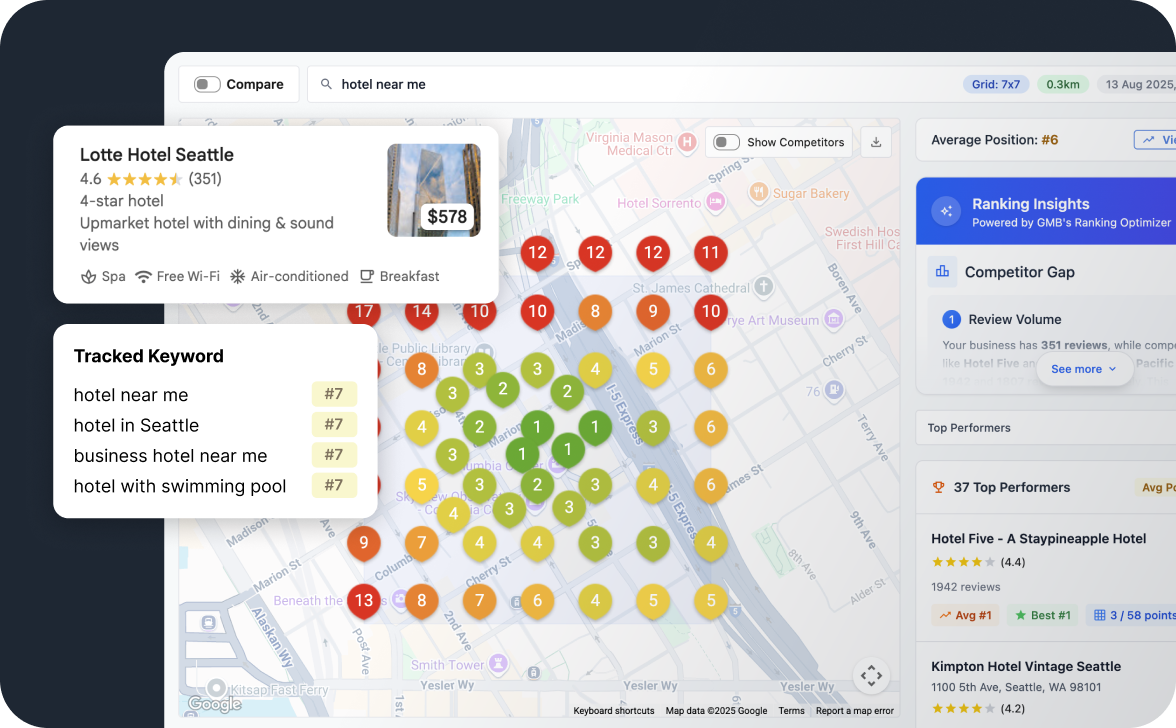
Grid My Business runs geo-grid scans that let you compare rank distribution before and after a change. It is the cleanest way to see whether the category correction moved anything.
One caution: do not change the primary category again if rank does not move immediately. Give it the full two weeks. Frequent category changes can trigger a review flag on the profile.
Secondary Categories: How Many Is Too Many
Google allows up to nine secondary categories, but adding all nine dilutes the signal your primary category sends. Google uses the full category set to understand the business. If you add eight categories that point in different directions, Google's interpretation of relevance gets less precise.
The 2026 best practice: two to three secondary categories, tightly related to the primary. They should describe services that genuinely complement the main offering.
If a client has a long list of services, use the Services section of GBP to describe them. Use categories for search relevance and the Services section for the full list of services.
Wrapping Up
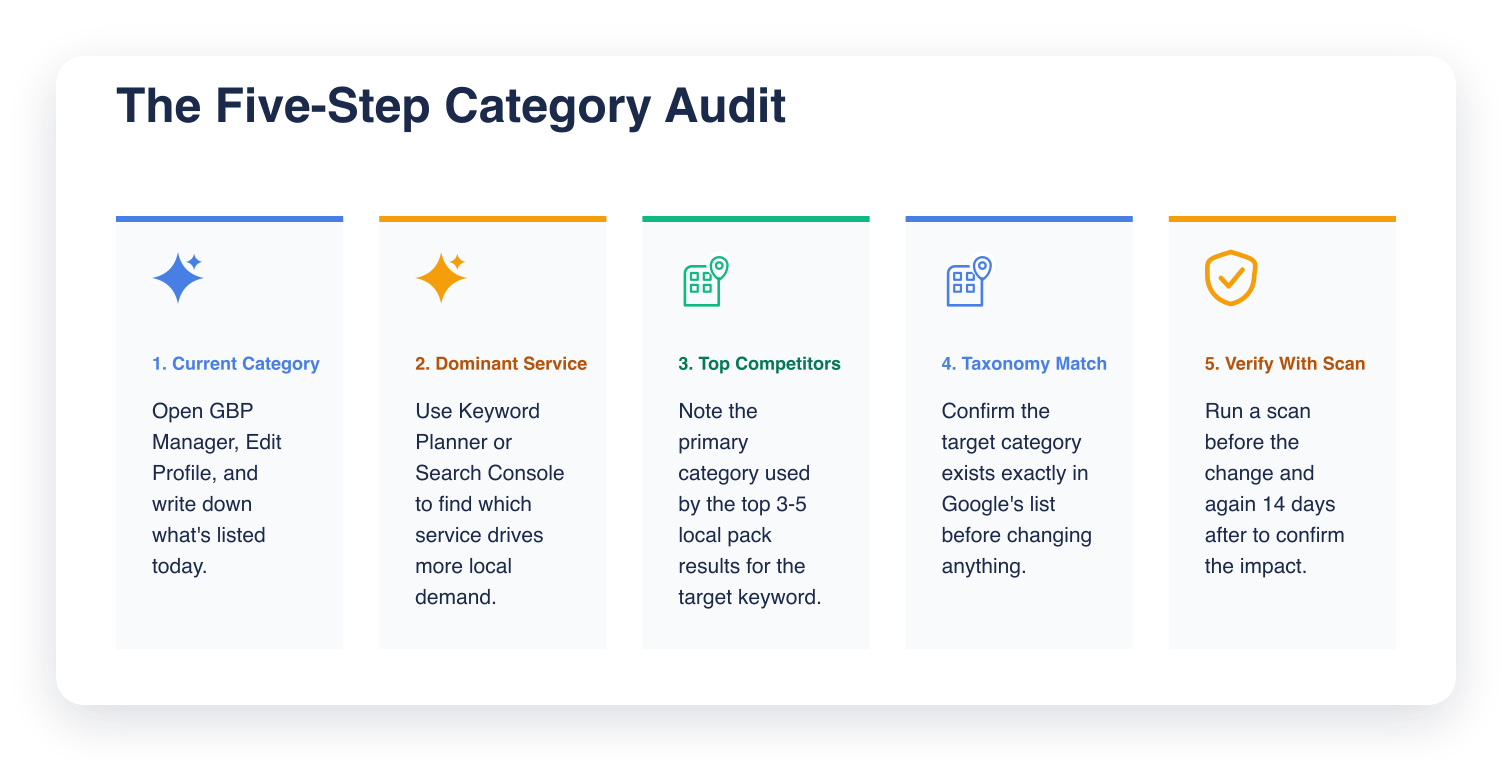
The audit is five steps: check what the profile is currently listed as, map the dominant service, research what the top-ranked competitors in the local pack are using, cross-reference against Google's taxonomy, and verify rank impact after the change with a grid scan.
Run this across a client roster and you will keep finding the same pattern: profiles sitting in a category broader than the business competes in. The fix is usually one change, confirmed by a grid scan two weeks later.
If you are not already tracking rank across the service area before and after changes, Grid My Business shows rank across the whole service area.
Frequently Asked Questions (FAQs)
Q: Does changing a primary category reset my Google Business Profile ranking?
A: No. A category change does not reset your profile or erase accumulated signals like reviews and citations. It changes which queries your profile competes for and how relevant Google considers you for those queries. Rank typically shifts within 7 to 14 days.
Q: Can I have the same primary category as my competitor?
A: Yes, and in most cases you should. If the top-ranked profiles in your vertical are all using the same primary category, that category is what Google associates with those queries. Differentiating on category to avoid competition usually backfires. It removes you from the pool entirely.
Q: How often should I review a client's primary category?
A: At minimum, quarterly. Also review it when the client expands or changes their service mix, when a new competitor enters the local pack, or when rank drops without a clear explanation. Category misfit is one of the first things to check when a profile starts slipping.
Q: Does primary category matter more for service area businesses or storefronts?
A: Both. The mechanism is the same: primary category sets relevance for the queries Google will consider the profile for. Service area businesses may see a wider geographic rank distribution shift after a category correction because they are not anchored to a single address.
Q: What should I do if no category in Google's list exactly matches my client's business?
A: Choose the most specific available option that accurately describes the dominant service. Do not force an exact-sounding match that misrepresents the business. Use the Services section and business description to provide the specificity that the category cannot. Google cross-references all of these signals.
Leave a Reply